• The forum software that supports hummy.tv has been upgraded to XenForo 2.3!

    Please bear with us as we continue to tweak things, and feel free to post any questions, issues or suggestions in the upgrade thread.

Aura App

MarkS

New Member
Hi,

Has anyone else had the issue with their Aura App not syncing the TV guide which has now made it impossible to set up recordings remotely this past week.

I have also had the issue of I cant watch the live TV in the app (but shows what is correctly on tv) and stream recordings from the Aura to the app. But I have discovered that I can still view live TV and recordings on my devices via the VLC App.

I have contacted humax but im not getting a response.
 
 
I need some help. I can’t get the app to connect to my Aura Box on my iPhone. Both the box and my phone are connected to the same Wi-Fi network. I’ve already reset the router and the box, but it still won’t connect to the app. What do I need to do to get it working? Does anyone know on here
 
I suspect the app does not connect to the Aura directly, but both the app and the Aura connect to a central Humax server and communicate that way. If so, it is irrelevant that they are both on the same network, what is necssary is that they both have access to the server.
 
I suspect the app does not connect to the Aura directly, but both the app and the Aura connect to a central Humax server and communicate that way. If so, it is irrelevant that they are both on the same network, what is necssary is that they both have access to the server.
I think you may be wrong. Sometimes when I connect to the Aura using the app (not something I do often) I can see information that says "Connected for Home & Remote features". Other times I get "Connected for Remote features - For Home features please connect to Home network". Underneath these possible messages are a list of available features:
  • TV Guide
  • On Now
  • Schedule
  • Recordings
  • Downloads
  • Casting
(Bold - Remote, Normal - Home=greyed out when only connected for remote features)
Although it claims "downloads" will download recordings when connected for remote features - it doesn't. In fact I can't get it to work at all.
"Schedule" can't save the schedule without a connection to the Aura - so the home network needs to be running.
If neither the Aura nor the phone with the app are connected directly to the internet but are connected to the home network (with no route to the internet) it is still possible to view recordings via the app. Therefore some features use a direct connection - thankfully. I don't fancy shunting recordings up to a Humax server and back down to my phone!
 
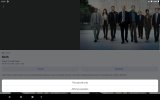
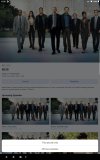
Since the re-establishment of the guide, I can now set up remote scheduling. However, I have an issue with the 'Record all Programmes' option. On my Samsung tablet this option is hidden behind the task bar at the bottom of the screen, so I can only choose 'This episode only'. Even changing the app's aspect ratio makes no difference.

If anyone knows a solution to this problem I'd appreciate it.
 
If anyone knows a solution to this problem I'd appreciate it.
Sounds to me like a problem I get on a number of apps: stupid UI designers don't account for those of us who think a screen should be in landscape mode! Try turning it to portrait (or, in iOS, split screen also helps because it reduces the screen ratio).
 
As far as I can tell the Aura app is in portrait mode only on a phone and can be in landscape for the EPG on a tablet.
On my phone and tablet (both Android) there are two lines at bottom of screen:
Screenshot_2025-12-27-11-51-35-629.jpegScreenshot_2025-12-27-11-55-19-322.jpeg
 
Back
Top