Black Hole
May contain traces of nut
Check the IP address hasn't changed.Edit: Now I'm wondering if I did get the update, because I can no longer connect via ftp. Both Explorer and WinSCP cannot connect.

Check the IP address hasn't changed.Edit: Now I'm wondering if I did get the update, because I can no longer connect via ftp. Both Explorer and WinSCP cannot connect.

If you had the update you would be on Android 14 now, If you look at ..........Device preferences then About ..........it says which version of Android you are on.I'd already checked that. WinSCP reports that the device actively refused the connection.
Patience and a willingness to look for solutions. Irritating though it is, it's better than the f@#&ing b@st@rds taking the FTP upload access away.Do you have to have circus experience before using this hideous device?
I don't understand why people continue to use the Aura. There are much better Humax PVRs available cheaply on ebay, and plenty of other options for streaming (apps on the TV, various streaming sticks etc).Do you have to have circus experience before using this hideous device?
Because I've already bought it, it's out of warranty and the resale value is poor - and it mostly works with a bit of TLC (not ch 12!). Some of us don't want second-hand stuff off ebay and my TVs don't accept apps.I don't understand why people continue to use the Aura. There are much better Humax PVRs available cheaply on ebay, and plenty of other options for streaming (apps on the TV, various streaming sticks etc).
Any HDR-FOXes I've bought that way have been in VGC. You just have to pick and choose.Some of us don't want second-hand stuff off ebay
Because I've already bought it, it's out of warranty and the resale value is poor - and it mostly works with a bit of TLC (not ch 12!). Some of us don't want second-hand stuff off ebay and my TVs don't accept apps.
Because I've already bought it, it's out of warranty and the resale value is poor - and it mostly works with a bit of TLC (not ch 12!). Some of us don't want second-hand stuff off ebay and my TVs don't accept apps.
Possibly the same thing but VLC on the Aura can play HEVC and some of the other more exotic codecs (although it does have problems with some). My 5000T and 2000T can't play them.Also 4K ,7.1 audio
How's it getting 4K and 7.1 audio? Not from Freeview. I get both 4K and either 7.1 or Atmos sound from my Apple TV 4K Gen 3. Combine that with a pair of HDR Fox T2s and I think I've got more capability and certainly much more reliability than an Aura...............................Also 4K ,7.1 audio and the ability to record 4 shows at once. If it had not had its issues it would have wiped the floor with all previous PVR's Humax or otherwise.
I presume that refers to this, which was a long way back in this thread!:Fair point,Steppy.
All this exporting and reimporting (or simply importing) on a computer is one thing, but on a Humax its quite another.
Go into settings and choose export, then once done import then back in and wait a few minutes for everything to load back in.
Personally I don’t do that anymore as I prefer to start with a clean slate in case something that I back up is the issue.
There's not a lot of export/import there.I presume that refers to this, which was a long way back in this thread!:
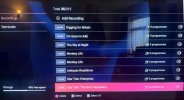
From what I see you have 215 scheduled recordings, that seems excessive.I've just done a Freeview Reset. My friend did the same because her Aura has issue that mine has. We both saved our User Preferences and then restored them after the reset. We both found that most of our recording schedule is squiffy. Initially we both had 2 programs which looked ok, then all the rest said 'Invalid' in the channel icon and zero programs to be recorded. (See attached). We both restored the settings again and found that we had a couple more programs that looked ok. We imported a few times now. I've get 10 ok programs and my friend has 7.
Is there a fix for this?
The odd times I have used the import function I have found you need to give it plenty of time for them to fully import.Initially we both had 2 programs which looked ok, then all the rest said 'Invalid' in the channel icon and zero programs to be recorded. (See attached). We both restored the settings again and found that we had a couple more programs that looked ok. We imported a few times now. I've get 10 ok programs and my friend has 7.
Thats a very good point you need to give time for the EPG to fully fill up for the next seven days before going in to the schedule.The odd times I have used the import function I have found you need to give it plenty of time for them to fully import.
The screen may say they have been imported successfully, but it takes a while for them to repopulate the schedule. If you look too soon you will get invalid entries.
Yours could take some time as you seem to have over 200 entries. If any of those are ‘0’ entries then I would have deleted them before I did the export.