bob_a_builder
New Member
And another thing ......
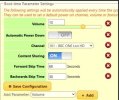
My box has been working fine for a good number of years, using a Fwd skip of 60, Back skip of 30
I now find that the Fwd skip is ALWAYS 2 mins per button press - regardless of the number of seconds I input - yes, I reboot after each setting change
I have tried removing the Fwd / Back skip entries and re-instating them in the boot-time setting section,
Not sure if relevant but have also run the Fix-Flash-packages
Tired a different remote
Switched box off for 10 mins/restart
But Fwd still skips 2 mins each time
for the record I did upgrade from 3.13 to 3.14 yesterday, but can't be sure if this problem occurred prior to that or not, but its certainly a very recent issue
Your suggestions welcome, thanks
My box has been working fine for a good number of years, using a Fwd skip of 60, Back skip of 30
I now find that the Fwd skip is ALWAYS 2 mins per button press - regardless of the number of seconds I input - yes, I reboot after each setting change
I have tried removing the Fwd / Back skip entries and re-instating them in the boot-time setting section,
Not sure if relevant but have also run the Fix-Flash-packages
Tired a different remote
Switched box off for 10 mins/restart
But Fwd still skips 2 mins each time
for the record I did upgrade from 3.13 to 3.14 yesterday, but can't be sure if this problem occurred prior to that or not, but its certainly a very recent issue
Your suggestions welcome, thanks
Last edited: