Channels disappearing

Sargan

Member
I rescanned after recent network changes.

Strange behaviour… I do an auto scan, and it finds amongst others
11 Sky mix
233 Sky news
Delete unwanted channels, Save and start using PVR as normal.
First hint of issue was recordings for Ch11 failed.

I have checked and both show OK on TV via its tuner.
I rescan, check those Ch are definitely there and watchable via PVR.

Then next time I come back to use TV, both channels are again missing in ‘TV guide’. Also any recordings set for Ch. 11 fail.

I rescanned .. same again, both there, then both disappear. Have done this 5 times.
I don’t think it’s an aerial issue as both channels remain on TV channel list and play OK.

Any suggestions ?

Using custom f/w build
 
Have you got tunefix installed and mis-configured it?
"next time" is not very descriptive. How long? Have you rebooted the machine since it worked?
The log file contents at /var/log/xinit.log will show if it is the above.
Which custom firmware version, and are your packages up to date? (Stating "custom f/w build" is mostly pointless.)
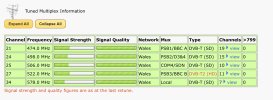
Which "amongst others"? Be specific. Is it the whole COM5 mux. that has gone? Look on the Diagnostics page under Mux Info.

I see you asked much like this before and were told to install tunefix-update. I guess you didn't. That would save you from having to retune at all.
 
Last edited:
I have rebooted machine, but just done so again
Previously everything was wiped Box would start up in basic set up menu, language etc.

I have never used tunefix but package is installed and after comments I also installed tunefix-update, but not used it.
And have never used it.

I don’t know what other channels are affected, but have noticed consistently it’s 11 and 233

I just tried connecting to box … but network will not allow connection, something for me to resolve.
I recently installed BitDefender and maybe it’s blocking connection.
 
Last edited:
I have rebooted machine, but just done so again
Congratulations!
By rebooting you are activating the mechanism that is being suggested is causing your claimed issue.

I have never used tunefix but package is installed and tunefix update, but not used.
And have never used it.
That is extremely unlikely.
By having tunefix installed you are using tunefix every time you reboot.
You have already claimed that you have rebooted, and have tunefix installed. What that means is that you are using tunefix.

I don’t know what other channels are affected, but have noticed consistently it’s 11 and 233
It is very likely that it is your tunefix settings that is causing the channels to disappear on reboot.
Only you can go into your settings for tunfix and see what it is setup to delete.
 
Last edited:
Congratulations!
By rebooting you are activating the mechanism that is being suggested is causing your claimed issue.


That is extremely unlikely.
By having tunefix installed you are using tunefix every time you reboot.
You have already claimed that you have rebooted, and have tunefix installed. What that means is that you are using tunefix.


It is very likely that it is your tunefix settings that is causing the channels to disappear on reboot.
Only you can go into your settings for tunfix and see what it is setup to delete.
OK …did not understand tunefix. Thought it was something to run to restore channels.
Hopefully I can resolve n/w issue in the morning.
 
Have you got tunefix installed and mis-configured it?
"next time" is not very descriptive. How long? Have you rebooted the machine since it worked?
The log file contents at /var/log/xinit.log will show if it is the above.
Which custom firmware version, and are your packages up to date? (Stating "custom f/w build" is mostly pointless.)
Which "amongst others"? Be specific. Is it the whole COM5 mux. that has gone? Look on the Diagnostics page under Mux Info.

I see you asked much like this before and were told to install tunefix-update. I guess you didn't. That would save you from having to retune at all.
Verified that tunefix and tunefix-update are both installed
I have never configured anything on either.

Custom Firmware Version: 3.13 (build 4028)
The whole COM5 mix seems missing ..screen snap shot

IMG_2281.jpeg
 
OK …did not understand tunefix. Thought it was something to run to restore channels.
Hopefully I can resolve n/w issue in the morning.
I have confirmed they are installed as I have never configured anything, where can I find what settings are applied ?
 
Back
Top