
Hi All,
I have installed chasedecrpyt and set a folder flag

I can confirm sharing is on via the humax menu and via the boot
I've had this setup for a number of weeks but still it won't do a chasedecrypt on F1.
Please can you confirm I should see an extra file / set of files in the folder if it is working?
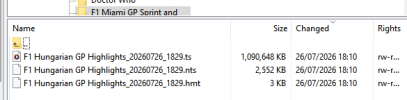
This is my ftp view showing all files in the folder whilst it's recording:
the log says this:
[td]1773[/td][td]26/07/2026 18:29:16 RM(27731)- Unrecognized option: 0[/td]
[td]1772[/td][td]26/07/2026 18:29:16 RM(27731)- ChaseDecrypt: Checking /media/My Video/F1 Miami GP Sprint and___/F1 Hungarian GP Highlights_20260726_1829.ts (Channel 4) for inclusion[/td]
What does 'Unrecognized option: 0' mean? I went to the setup and I noticed there was no extra option (based on the wiki screenshot) so I added the -d to see if that would help but I wouldn't have thought that that would have made a difference as that's just for extra debug info?
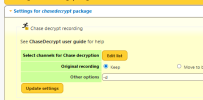
I don't have any channels setup for chasedecrypt nor detectads setup. I have simply installed chasedecrypt and let it install what it needs and then flagged the folder.
I have also tried uninstalling and reinstalling but that doesn't seem to have made a difference either.
Please can someone help me diagnose this issue?
Thanks
I have installed chasedecrpyt and set a folder flag
I can confirm sharing is on via the humax menu and via the boot
I've had this setup for a number of weeks but still it won't do a chasedecrypt on F1.
Please can you confirm I should see an extra file / set of files in the folder if it is working?
This is my ftp view showing all files in the folder whilst it's recording:
the log says this:
What does 'Unrecognized option: 0' mean? I went to the setup and I noticed there was no extra option (based on the wiki screenshot) so I added the -d to see if that would help but I wouldn't have thought that that would have made a difference as that's just for extra debug info?
I don't have any channels setup for chasedecrypt nor detectads setup. I have simply installed chasedecrypt and let it install what it needs and then flagged the folder.
I have also tried uninstalling and reinstalling but that doesn't seem to have made a difference either.
Please can someone help me diagnose this issue?
Thanks



