
You are using an out of date browser. It may not display this or other websites correctly.
You should upgrade or use an alternative browser.
You should upgrade or use an alternative browser.
[ir] Web-based Remote Control
- Thread starter af123
- Start date

The
The linked Apple doc, albeit from iOS 7, suggests that iOS Safari generates
The tooltip could be replicated with a CSS
The WebIf mobile page, with a full width link instead of a
hover effect can be triggered from CSS or with JS by setting up a listener for mouseover. In this case the tooltip for a macro <button> is results from its title attribute, and not a styled or scripted hover. In the corresponding mobile WebIf page there is only a link and no button or title of either, so there's no tooltip regardless of browser capability/deficiency.The linked Apple doc, albeit from iOS 7, suggests that iOS Safari generates
mouseover based on the platform's native touch events. However Apple decided to ditch the convention of presenting the title as a tooltip, or in fact having tooltips at all AFAICS, in the mobile Safari browsers. Maybe it was felt to be too hard to handle the simultaneous tooltips that might arise from up to 10 (or more in W Virginia or Norfolk) separate mouseovers. The tooltip could be replicated with a CSS
hover style, but the long press action is probably mapped to cut/copy by default in iOS Safari which would prevent it being used for hover in the styled case without more work..The WebIf mobile page, with a full width link instead of a
<button>, could be tweaked to provide the missing tooltip, eg putting the code sequence in a L-R scrollable textarea in the macro button after the macro name, so long as macro names are not too long.
Black Hole
May contain traces of nut
Or just have a button (like the delete) which displays the macro text? Seems simple enough...The tooltip could be replicated with a CSShoverstyle, but the long press action is probably mapped to cut/copy by default in iOS Safari which would prevent it being used for hover in the styled case without more work..
'Scuse me, but this is a technical discussion, and while the odd (preferably erudite) quip might be welcome, reference to sexual function seems inappropriate anywhere on this forum (let alone interrupting a technical thread). Kindly keep your smutty mind to yourself. Whatever you might think, at least some of us are not in your gutter, and having to tell you that is pollution. You also need to keep in mind that this forum is not closed to minors.It seems that I hit a nerve with the.
Too many dysfunctional grumpy old men here I guess. "Not relevant to the thread" I shall remember that one for future use.


Black Hole
May contain traces of nut
I see ir has had an update... why?

prpr
Well-Known Member
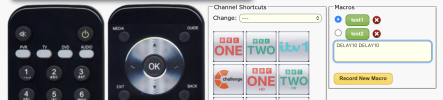
I went for radio buttons and a textarea. Hopefully it suffices.Or just have a button (like the delete) which displays the macro text?
Nobody else has volunteered any code...Seems simple enough...
It would be nice to get the box to auto-size but it's more effort than I can be bothered with researching.
Black Hole
May contain traces of nut
Dandy. I'll check it out when auto-update kicks in.

MymsMan
Ad detector
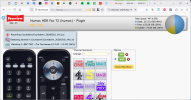
I'm seeing checkboxes but no textarea (Firefox on win11)I went for radio buttons and a textarea. Hopefully it suffices.
Black Hole
May contain traces of nut
Works for me (DDG for iPadOS), you just can't get rid of it again even if the macro gets deleted (but only have to refresh the page).
prpr
Well-Known Member
I've tried it on FF on Linux Mint, Win10 and Win7 (don't have Win11) and on Chrome on LM and even Edge (ugh) on W10. All work OK, although it's amazing how the rendering is slightly different.I'm seeing checkboxes but no textarea (Firefox on win11)
Yes, I found that after I'd released it. Will look at fixing.you just can't get rid of it again even if the macro gets deleted
prpr
Well-Known Member
Fixed.Will look at fixing.
MymsMan
Ad detector
It worked on another laptop so probably related to a browser caching issue.
Does it need to be text input area rather than an output area. Making it an input are makes it look as if you could edit the macro by typing into the box which you cant.
I hadn't realised until just now that any keystrokes entered on the webpage are sent directly to IR, pressing space Paused the programme my wife was watching!
Does it need to be text input area rather than an output area. Making it an input are makes it look as if you could edit the macro by typing into the box which you cant.
I hadn't realised until just now that any keystrokes entered on the webpage are sent directly to IR, pressing space Paused the programme my wife was watching!
prpr
Well-Known Member
Changed. It fixes the autosize problem too. Hopefully that's it now for this.Does it need to be text input area rather than an output area.
Yes, that caught me out when I first did it.I hadn't realised until just now that any keystrokes entered on the webpage are sent directly to IR