
Package Update Failure

Black Hole

May contain traces of nut
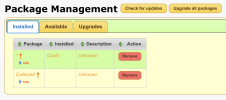
I tried to do an "upgrade all packages" and it bombed out, leaving me with this:
1770571207247.png
All packages now seem to be listed under "available".

Any way to recover this situation, or do I have to rebuild? What caused it?
 
webif-error.log:

Code:
08/02/2026 17:15:24 - /mod/webif/html/pkg/pkg.jim:140: Error: can't read "data(version)": no such element in array
08/02/2026 17:15:24 - Traceback (most recent call last):
08/02/2026 17:15:24 -   File "/mod/webif/html/pkg/pkg.jim", line 140
08/02/2026 17:15:24 -     if \$data(installed)\ ne\ \"0\"\ &&\ \\\n\t\t\t\ \ \ \ \$data(installed)\ ne\ \$data(version) {...
08/02/2026 17:15:42 - /mod/webif/html/pkg/pkg.jim:140: Error: can't read "data(version)": no such element in array
08/02/2026 17:15:42 - Traceback (most recent call last):
08/02/2026 17:15:42 -   File "/mod/webif/html/pkg/pkg.jim", line 140
08/02/2026 17:15:42 -     if \$data(installed)\ ne\ \"0\"\ &&\ \\\n\t\t\t\ \ \ \ \$data(installed)\ ne\ \$data(version) {...
08/02/2026 17:15:46 - /mod/webif/html/pkg/pkg.jim:140: Error: can't read "data(version)": no such element in array
08/02/2026 17:15:46 - Traceback (most recent call last):
08/02/2026 17:15:46 -   File "/mod/webif/html/pkg/pkg.jim", line 140
08/02/2026 17:15:46 -     if \$data(installed)\ ne\ \"0\"\ &&\ \\\n\t\t\t\ \ \ \ \$data(installed)\ ne\ \$data(version) {...

Any other logs useful?
 
Exactly how old is all that stuff? Some version numbers of critical things would help.
Try stuff from the command line:
Code:
opkg update
opkg list-upgradable
and if it the above is not too horrendous:
opkg upgrade
and see what it reports.
I wonder if something hasn't got corrupted though.
 
Exactly how old is all that stuff?
I don't know, auto-update seems to have stopped working some time in the past.

Code:
HDRFOX4# opkg update                                                                                    
Collected errors:                                                                                        
 * opkg_conf_load: Could not lock /tmp/opkg.lock: Resource temporarily unavailable.                      
HDRFOX4#
(It's recording at the moment, if that has anything to do with it)

Update: same thing, not recording any more.
 
Last edited:
I don't know, auto-update seems to have stopped working some time in the past.

Code:
HDRFOX4# opkg update                                                                                   
Collected errors:                                                                                       
 * opkg_conf_load: Could not lock /tmp/opkg.lock: Resource temporarily unavailable.                     
HDRFOX4#
(It's recording at the moment, if that has anything to do with it)

Update: same thing, not recording any more.
Either another opkg instance is still running or you have an orphan lock file preventing execution.
Delete it & try again!
 
But he said it was recording, so when it isn't...
And it's currently extracting MP3...

Things seem to be generally working though, it recorded from radio, sweeper renamed the recording, and it's being converted (a folder default). If packages were not installed it wouldn't be doing those things shirley?

I will try rebooting (when it's finished), but my feeling is this is a presentation thing through Jim.
 
If packages were not installed it wouldn't be doing those things shirley?
Nobody said the packages weren't installed right now.
my feeling is this is a presentation thing through Jim.
Well yes, but why? Possibly the opkg database at /mod/var/opkg/status is corrupt?

And don't call me...
 
Hellfire. I don't know what kind of unholy mess this is.

Reboot did not go well. It is now not responding to HTTP (not even the holding page), and yes I have checked network is connected, and yes it does ping.

Went in by Telnet, got the menu, tried fixweb:

Code:
Please select option: fixweb
Collected errors:
 * opkg_conf_load: Could not lock /tmp/opkg.lock: Resource temporarily unavailable.
Collected errors:
 * opkg_conf_load: Could not lock /tmp/opkg.lock: Resource temporarily unavailable.
Collected errors:
 * opkg_conf_load: Could not lock /tmp/opkg.lock: Resource temporarily unavailable.
/bin/sh: /mod/etc/lighttpd/extra.d/exitalias.conf: line 1: syntax error: unexpected "("
2026-02-08 23:19:15: (configfile.c.1461) command "for f in /mod/etc/lighttpd/extra.d/*.conf; do if [ -x "$f" ]; then . "$f"; else cat "$f"; fi; done" exited non-zero: 2
2026-02-08 23:19:15: (configfile.c.1289) source: /mod/etc/lighttpd/server.conf line: 62 pos: 8 parser failed somehow near here: (EOL)

Press return to continue:

By the way, in case anybody else is wondering (for search hits)...
Linux Mint 22.1 (but probably applies to other Linuxes)

Telnet session in PuTTY, highlight text with mouse and the how the hell do you copy & paste that into a forum post??? It's not obvious.
  1. Left-click & drag to highlight the text in question;
  2. Release button - this copies the text into some kind of PuTTY internal buffer NOT the normal copy-paste buffer;
  3. In a plain text editor (NOT the browser), middle-click to paste (this may be the scroll wheel, or left+right together);
  4. Copy and paste in the normal way from the text editor to the forum post. What a load of nonsense!
HTH. Took me a while (and web searches, which were not easy either) to figure it out.
 
Last edited:
Okay, well I'm currently ftp'ing off the /mod tree hoping any cfg files captured will help me set it all up again. Looks like something like 10,000 files. Obviously I can't just copy everything back...!

Hmm... execute permissions don't seem to have been preserved. Should they have been, if I used the right command? FileZilla. (Update: no file preservation in FileZilla, or FTP in general.)
 
Last edited:
Nothing of any note. It can't handle non-ASCII characters apparently, which is probably override-able, but it's uninteresting in this particular case.
 
What's going wrong here?:

Code:
HDRFOX4# pwd
/
HDRFOX4# tar -cp -f mnt/hd1/mod.tar.gz mod
HDRFOX4#

The output is a 1.5k archive comprising a 0-byte "mod" file.
 
Use "mod/*" or cd into mod and use "."
You need the "z" option for a .gz file.

But you'll get loads of stuff of absolutely no interest doing this.
The stuff you are going to want will be in (assuming already in mod, and dependent on package use):
etc​
monitor​
settings​
var/backups​
and
/mod/boot/​
for the flash stuff.
And, of course, whatever recordings.
 
Back
Top