Sagemcom BT/EE TV Box Pro

No notification of an update on mine this morning, but software version is now 4.3.198. It was 4.3.166 last month.

Looked through all the settings, but couldn’t see anything obvious.

I think the only change I would like is for the hard drive to go to sleep when it is in normal standby, rather than it only going off in deep standby.
 
Looked through all the settings, but couldn’t see anything obvious.
There are few different aspects that could be in the build,yes some of them could be visible, some of them could just be preparing for further changes, or it could be other changes which the user of the box could never observe.
From previous updates I've had the impression that the latter is more likely. Not usually but I think there has been a couple of posts on either EE TV or BT TV forums asking what the changes are, which one of the developers has responded to with that the changes won't be viable to a user of the box.
 
Last edited:
my LG TV which has a very delayed start with different graphics on screen, so you know it's loading something
Probably 'uploading' something too i.e. the details of all the devices on your network that it has illegally snooped.
 
Probably 'uploading' something too i.e. the details of all the devices on your network that it has illegally snooped.
Very probably!
The TV was advertised as having Bluetooth for headphones and even a keyboard - it has, BUT it will only connect to LG branded and supplied items! How funny, yet again misleading marketing information - put another way, total lies! Needless to say, I have not purchased any further LG items.
 
I manually checked and said there was an update. I've not had the box long so maybe it's just put me on another brewer one that must are already on? I did update it as soon as I originally set it up

Mine shows version:
Component 4.3.198 (b15d7c)
Manufacturer software 0.16.246
 
This morning my box is showing signal lost on every channel, when I go to signal quality it says 0%
I have checked on the freebies service status page and it says there's no issues in my area.
 
This morning my box is showing signal lost on every channel, when I go to signal quality it says 0%
I have checked on the freebies service status page and it says there's no issues in my area.
Is your TV still getting a signal if you connect the aerial into it?
 
It is ok now, other local people here in Liverpool also reported theirs went off, although when doing status check said there were no issues.
I done a retune and I could only get Wales channels. Later on in the day I done another rretune and iit showed as Liverpool again.
 
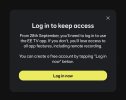
I had the below message when I logged into the App yesterday

I already have a login so was a little unsettled when I saw it, but I was still able to set items to record.

It will be interesting to see if anything happens after 28th September.
 

Attachments

  • IMG_1508.jpeg
    IMG_1508.jpeg
    121.9 KB · Views: 15
Last edited:
Hmmm? I hope that does only mean exactly what it says - you will lose access to "all the app features and remote recording" none of which I bother with these days.

On the other hand, it maybe the first stage of locking people out of using the box as a generic Freeview recorder IF they don't have an EE TV account?

If so, the box will get recycled to the bin (just like I had to do with their rubbish advanced telephones) and welcome to Manhattan, probably the S4-R and Freeview and EE/BT can do one!

My LG TV does the YouTube, Netflix and Prime duties anyway, with a Firestick 4K Max in reserve, so it will just mean using 2 remotes instead of one - I can probably put up with that.:)
 
I guess it depends on what they are referring to when they say login… the app or an EE TV account.

We currently are an EE FTTP customer, but do not subscribe to any EE TV packages.

Time will tell ….
 
Hmmm? I hope that does only mean exactly what it says - you will lose access to "all the app features and remote recording" none of which I bother with these days.

On the other hand, it maybe the first stage of locking people out of using the box as a generic Freeview recorder IF they don't have an EE TV account?

If so, the box will get recycled to the bin (just like I had to do with their rubbish advanced telephones) and welcome to Manhattan, probably the S4-R and Freeview and EE/BT can do one!

My LG TV does the YouTube, Netflix and Prime duties anyway, with a Firestick 4K Max in reserve, so it will just mean using 2 remotes instead of one - I can probably put up with that.:)
Definitely. I have already taken the S4-R route as I find the BT Box interface so tiresome. The Manhattan approaches the interface from the user perspective rather than the developer's. I think the biggest issue is that you cannot customise anything on the BT box. Only use the BT Box to subscribe to HBO sports so it won't take much to take aim at the recycle bin.
 
I find the BT Box interface so tiresome.

I’m curious, what do you find tiresome about it?

I think it’s a great interface, clear, snappy, visually appealing and has a great App too.

Yes customisation is lacking, but that is because is built upon the YouView platform which is well known for being locked down, so I knew that when I bought it

I use it as a second box for the bedroom and it hasn’t put a foot wrong since I’ve had it.
 
I’m curious, what do you find tiresome about it?

I think it’s a great interface, clear, snappy, visually appealing and has a great App too.

Yes customisation is lacking, but that is because is built upon the YouView platform which is well known for being locked down, so I knew that when I bought it

I use it as a second box for the bedroom and it hasn’t put a foot wrong since I’ve had it.
On the Manhattan I get to the list of recordings by pressing the Recs button. If I remember correctly on my (old) BT box it is Menu, Left, Down, Down then OK then Right. Manhattan Schedule is 2 buttons, BT as before plus Right, Right. In the Guide I want HD & Subscribed (only, every time), so it's Blue button then right then OK every time I access the Guide. If I want Radio in the Guide it doesn't support wraparound so it's many, many Rights to get there. Too many clicks to get anything. The boot time is also horrendous, turn it on, have a nap and it might be ready - Manhattan is about 10 seconds. I understand the YouView restrictions but maybe that shouldn't be used on a PVR (lookalike).
 
I think the interface must have changed since you had your BT box as the latest EE box I have is definitely not as long winded as that.

There is not a dedicated button for recordings but it’s only a couple of clicks from the main hub.

When the Manhattan can record as many channels as the Aura/EE box then I will look again if the EE box ever gets locked down to subscription only.

You’re happy, I’m happy that’s the main thing :thumbsup:
 
I think the interface must have changed since you had your BT box as the latest EE box I have is definitely not as long winded as that.

There is not a dedicated button for recordings but it’s only a couple of clicks from the main hub.

When the Manhattan can record as many channels as the Aura/EE box then I will look again if the EE box ever gets locked down to subscription only.

You’re happy, I’m happy that’s the main thing :thumbsup:
Fairy snuff. I have been wondering, given other comments here, if my box has been superseded. Given the huge amount I pay BT for a "premium service" they could send me an updated box. Maybe I need to "upgrade" to EE but I have seen negative comments about the process. Alternatively, hope that the BT box fails. Hey ho.
 
I thought that it was the same software regardless of whether it was a BT box or an EE box, unless yours is very old and can’t update to the latest software?.
 
Back
Top