
[Solved] How to mount Hummy drive as read & write?

Machine

New Member
Hi guys,

Struggling with something, I cannot figure out why I cannot mount my Humax's drive as read & write? (My Humax is called Soundwave because he was in the 80's the coolest transformer)

1775050323313.png

If I run that, I can mount the drive, it asks for my linux password, then the hummy one (which is blank) - I can browse, read stuff, play videos / music on my PC from the hummy
1775050417315.png

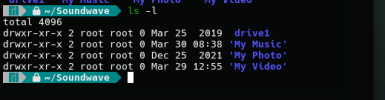
If I try to mkdir test it fails with permission denied, but if I "sudo mkdir test" IT WORKS! Why??

I've managed to make a git server out this thing which pull/pushes just fine, but I feel like I'm bouncing off something dumb here, what am I missing?

Appreciate the help chaps, thanks :-)
 
So... what packages have you installed in the CF to enable network sharing? samba I presume. Take a look at the configuration to see how the share is set up – /mod/etc/smb.conf (and perhaps others), you might need to modify it.

Be aware the original samba package is only SMB1/2, if you want SMB3 you'll need the beta package.
 
1775055725482.png

I've got this one, I did have a poke about in the smb.conf over the weekend, restarting each time, no joy. Where could I get hold of this beta package you speak of? I've got advanced packages enabled but can't spot anything obvious?
 
If I try to mkdir test it fails with permission denied, but if I "sudo mkdir test" IT WORKS! Why??
Because "dan" != "root" and "root" owns the directory. I'm fairly sure you can override stuff with the right option(s) in smb.conf but reading the documentation fills me with horror every time, as does testing it.
/media is a tmpfs so creating stuff there is going to go away in the not too distant future.
I've got advanced packages enabled but can't spot anything obvious?
Install the opkg-beta package and then try again.
 
The two attempts I've had using AI generated code failed. Far better, and easier, to do it yourself. It's quicker to learn what to do and how to do it compared with debugging AI generated garbage.
 
I work as a software engineer, AI is a fancy search engine, that is all, it has the appearance of clever but it's just working out the average response of it's input. Each time I have used it it has been frustrating, however, it IS good at making boiler-plate templates for quick things.

Anyway, on topic, I finally managed to fix this, it was a complete and utter ball-ache of a task to figure out, here's what I did, the key ended up being the way you mount the drive in linux from the connecting machine. I have a feeling this would have worked with the default SAMBA package, but I'd done the beta packages route by that point.

The command I needed to use from my linux machine (The connecting client) was this...

sudo mount.cifs -v -o rw,vers=2.0,username=settop,password=mymilkshakebringsalltheboystotheyard,dir_mode=0777,file_mode=0777 "//soundwave/drive2" /home/dan/Soundwave

I had already added this to my /mod/etc/smb.conf (Just below the hotplug line) on the Hummy.
include = /mod/etc/smb-mach.conf

This file contains,
[drive2]
comment = drive2
path = /media/drive1
writable = yes
browsable = yes
create mask = 0775
directory mask = 0775
hide dot files = no
force user = settop
valid users = root settop

NOTE that the masks have been changed from default

So now I have a method of mounting the drive, which I'll now go figure out how to do either in fstab, or as a post boot up shell script, and using the Hummy's space as a drop point for my rSync backups of code / photos / Pink Floyd

Thanks for the help and pointers, but man, what a palaver.

EDIT : I realise the security on the above might not be ideal, but I can work that backwards now with credentials file on the command line, plus work out if I need the 777 or it can be backed off a little.
 
Last edited:
what a palaver
Indeed. So, as you're on a Linux machine, why don't you just use NFS instead of Samba? It's a whole lot easier and the default configuration on the Humax package doesn't have all this access permission nastiness.
e.g. sudo mount soundwave:/media/drive1 ~/Soundwave

(I find your (mis-)use of drive1/drive2 a bit odd.)
 
Honestly I changed the name of the share to drive2 ONLY because I wanted to be sure my config was making a difference and it kept the original config - I later found how to completely re-install and force defaults again during my travels. It's splitting hairs though and I'm not letting perfect to get in the way of "good enough"

I tried your command and I get "mount.nfs: No such device or address for (null) on /home/dan/Soundwave"

So I'm probably missing something on the Hummy or my machine, it's something I'll investigate now I've a working route here in case it is as you say; more graceful.
 
You (moderately obviously) need to install the nfs-utils package on the Humax, like you had to install the samba pacakge.
 
what a palaver
I don't agree – you wanted to do something that isn't standard out of the box, and the tools were available to get it done. Just imagine the palaver it was providing the facility in the first place. You can't expect the sophistication (by which I mean hiding away the nitty gritty) of modern operating systems when implemented in a few megabytes and on a CPU with the power of a candle. By hiding away the details, users are given a smooth ride but also don't get to understand how it all works... and how to make it work if it doesn't.

All you really needed to do was make sure you were connecting from the client as user "root". Be grateful that it doesn't just lock you out!
 
@prpr - Ahh yes, you are right, I should have researched this, I come from 20 odd years of Windows - It does indeed look WAY easier using NFS, you live and learn, I will be digging about with it because I've managed to move my main dev and gaming machines to Linux and it's going so well, but it's a bit of a new world for me still.

@Black Hole - Weird post man, but thanks I guess.
 
Back
Top
