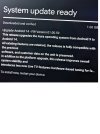
The Aura Android update.

:oops: I wonder if I may the cause with my reply to the OP in post 2 of this thread. Maybe woodbar did not read further into the thread.
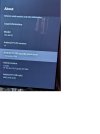
Maybe, but I was wondering if I mentioned the version of Android on my phone somewhere - turns out that might have only been a DM.
 
Why would anybody post about "an Android system update for your phone" in a forum sub-section titled "Aura UHD Android TV Recorder" in the first place?
I think woodbar's post was unnecessary, as it's blindingly obvious what it pertains to given the context, not that the preceding message was a model of clarity - it was just four words dashed off in a wish to be "first".
I think the Aura App is to control the Aura with a phone rather than an Aura remote, at least that is my guess as I just use the remote.
And they had issues with login credentials to the Aura.
 
I think the Aura App is to control the Aura with a phone rather than an Aura remote,
Sort of. In theory you can view the EPG, set schedule, play recordings on the phone, download recordings and use your phone to watch a live channel from the Aura. it says something about casting - but I cant get that to work because I'd end up trying to cast the Aura back to itself. I can't see an easy way to change channels from your phone using the app. (Although you can call up a webpage to do that - http://<aura ip address>:8080/page/index.html )
 
As another member said that they downloaded it 2 weeks ago. I am amazed that it took so long for it to be mentioned, I would have thought any member worth their salt would have come straight here to tell us and provide at least a little info and follow up with how well it works long before this guy did.
After I had the Android 14 update a couple of weeks ago and while reading your response I checked my Aura and had a message flag on the top row of the home screen , after clicking I got another big update.
I have attached 2 screenshots to this post.
The update and the info page of the device.

In my case it has not fixed the USB formatted to NTFS issue which used to work since I got the box , FAT32 does work but not for over 4Gb files .
I will test the FTP status and what else has changed next.
I am not sure why I got a second update and it ran differently from the first one it has literally just arrived today.
 

Attachments

  • Aura Update info.jpg
    Aura Update info.jpg
    145.4 KB · Views: 12
  • Aura Update.jpg
    Aura Update.jpg
    278.4 KB · Views: 13
"All existing features are retained" - Hmm, not according to the reports that have read so far (FTP - Am I the only one who uses the Aura as a media player, using the internal disk rather than a USB one?)
 
"All existing features are retained" - Hmm, not according to the reports that have read so far (FTP - Am I the only one who uses the Aura as a media player, using the internal disk rather than a USB one?)

"All existing features are retained" - Hmm, not according to the reports that have read so far (FTP - Am I the only one who uses the Aura as a media player, using the internal disk rather than a USB one?)
Aura FTP according to the online Manual:
httpsxxxx://me.humaxdigital.com/wp-content/uploads/sites/6/2020/10/WebUM_FVP-4KGTR_100GB_21-0210.pdf

File Share: Set to On to open the Aura HDD. You can
copy files from Aura HDD to the PC storage or bring media
files from the PC to the HDD.


They say it works but what folders they mean is not stated
 
They say it works but what folders they mean is not stated
This is a trial and error thing - or was. If you manage to FTP into the box and explore the available directories (folders) most allow creation of subdirectories and files, and you can delete them. Settings, Recordings and, oddly, Download have files in them. Probably best not to mess with them, although Settings and Recordings contain an Upload directory containing instructions.
 
Back
Top