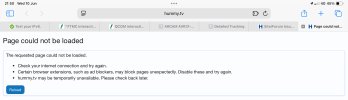
Not just iOS. I've had the identical "page could not be loaded" message but only on this site. The confusion for me is that the page looks like it has been generated by this site. (On my PC or phone the page matches the style of a hummy.tv one. The hummy.tv style is not the same as my default style.)
If it's the identical message to the below, it seems a strange message to come from the hummy.tv site... e.g.:-
"
Check your internet connection and try again" - that would be the browser, as if you've connected to a website, if wouldn't (/shouldn't) say that - as you would have just connected to it!
"
Certain browser extensions, such as ad blockers, may block pages unexpectedly. Disable these and try again." - that one
seems to be a suggestion from the broswer.
"
hummy.tv may be temporarily unavailable. Please check back later." - that would be the browser, as if hummy.tv had a problem it wouldn't say it
may be temporarily unavailable!
The style being the same as the hummy.tv one could be that it's following the style of the last page viewed - assuming there was a successful visit to hummy.tv prior to refreshing/reloading the page(?).
I've had no issues or error messages trying to load hummy.tv from laptop (Windows 11, latest Chrome/Edge/Firefox - on Virgin Media fibre broadband) or mobile (Android 16, latest Chrome/.DuckDuckGo - on either the same Virgin bb or vodafone 5G).
Are there any CDN's (Content Delivery Network) involved with hummy.tv? If so, that's another place to look at.