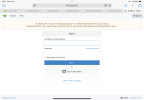
Three mobile network appears to be blocking hummy.tv

I have no login for this Three account, I bought it as a physical SIM to go with my iPad 3 (yes that long ago) when that was a new product. I've tried getting a login to go with it, but Three refuse to provide one unless I change to a current contract. Which I am not going to do because this SIM has free EU roaming. I can't find any current mobile provider with free EU roaming for a data SIM that will go in an iPad, they all limit the free roaming to phones these days.
Three doing this to you... it's been bugging me! They should still help a customer with an issue like that one you had... without requiring changing contracts.
Another thing to try is some basic IP tools, like DNS lookup of hummy.tv, PING, and Traceroute... it there a way you can access these tools on an iPad? Maybe an IP toolbox App, if there is no pre-installed option.
 
Something else to try is to change your DNS to Cloudflare's standard ones (1.1.1.1 and 1.0.0.1), or Google's (8.8.8.8 and 8.8.4.4) or combination of both (one from each).
 
Why or how could this be a DNS problem, given that the error is obviously coming from hummy.tv ?
Messing about with DNS isn't going to fix this.
 
Why or how could this be a DNS problem, given that the error is obviously coming from hummy.tv ?
Messing about with DNS isn't going to fix this.
It's something for @Owen Smith to try on his iPad - if IP tools aren't accessible. To me, the error is coming from the web browser... websites wouldn't say "Check your internet connection and try again", etc. As per post #18...

If it's the identical message to the below, it seems a strange message to come from the hummy.tv site... e.g.:-
"Check your internet connection and try again" - that would be the browser, as if you've connected to a website, if wouldn't (/shouldn't) say that - as you would have just connected to it!
"Certain browser extensions, such as ad blockers, may block pages unexpectedly. Disable these and try again." - that one seems to be a suggestion from the broswer.
"hummy.tv may be temporarily unavailable. Please check back later." - that would be the browser, as if hummy.tv had a problem it wouldn't say it may be temporarily unavailable!

The style being the same as the hummy.tv one could be that it's following the style of the last page viewed - assuming there was a successful visit to hummy.tv prior to refreshing/reloading the page(?).

I've had no issues or error messages trying to load hummy.tv from laptop (Windows 11, latest Chrome/Edge/Firefox - on Virgin Media fibre broadband) or mobile (Android 16, latest Chrome/.DuckDuckGo - on either the same Virgin bb or vodafone 5G).

Are there any CDN's (Content Delivery Network) involved with hummy.tv? If so, that's another place to look at.
 
Just bear in mind I said:
The confusion for me is that the page looks like it has been generated by this site.
"looks like" is not the same as proof. Although the blue H on the tab in post #1 and the style of error are a good indication Unfortunately until the error repeats for me I can't investigate.
 
The style being the same as the hummy.tv one could be that it's following the style of the last page viewed - assuming there was a successful visit to hummy.tv prior to refreshing/reloading the page(?).
No there was not. A got an email saying a watched thread had a new posting, clicked on it, new browser tab opened in Safari, and then I got the error in the screenshot. It is indeed obviously in the hummy.tv style so looks like the .css file was served.
 
To me, the error is coming from the web browser... websites wouldn't say "Check your internet connection and try again", etc
Well they do say that, or at least this one does. Maybe it's a XenForo thing - it certainly looks like it.
Yes it's stupid, but there it is. Take it or leave it. I don't care. But you're wrong.
 
Back
Top