[youtube-dl] Download files from youtube.com or other video platforms

Most downloads these days take about 5-6 times repeating the command to get the video and audio to finish downloading.
On a PC and with the latest yt-dlp I've found that YouTube's format 18 often requires more than the 10 default retries. Fortunately if the download fails after 10 retries it will restart by repeating the command. If I remember I use --retries 50.
 
Having used Qtube in immediate mode to download .m4a from iPlayer raw (so as not to have to wait for the subsequent conversion), I then used a script and ran it in abduco to batch-process the conversion to .mp3 without me having to mind it.

Code:
ffmpeg -i radio_show.m4a -c:v copy -c:a libmp3lame -q:a 4 radio-show.mp3

Judging from the file timestamps, this took about the same length of time as it would have done being queued with process options
Code:
-x --audio-format mp3
.

So I'm back to the same question @prpr @/df , if I can do the download manually and convert it manually, why does it bork when put on the process queue?
 
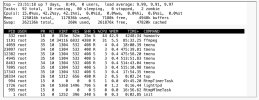
Radio recording conversions being auto-processed are taking a very long time compared with "normal", eg 6 hours for a 30 minute recording (which is about double). Trying to find out why, I ran a top:

IMG_5366.jpeg
Why are there so many tmenu processes running? Yes, OK, I was doing cli earlier on, and the sessions were timing out, but shouldn't they have terminated? If that's minutes and seconds, it doesn't really add up, and the processing slow-down has been for much longer than that.
 
That's better. I killed all those tmenu processes (the only way I knew how: individually by kill <PID>, and the ffmpeg process has gone up to 90% CPU.

If somebody could explain where the tmenus came from, please?
 
No idea what tmenu is, but if I understand your process list they mostly have the same priority as ffmpeg. Any chance you can increase ffmpeg's priority or is it at maximum? Or lower tmenu's somehow.
 
No idea what tmenu is, but if I understand your process list they mostly have the same priority as ffmpeg. Any chance you can increase ffmpeg's priority or is it at maximum? Or lower tmenu's somehow.

tmenu = Administration (Telnet) menu

Code:
humax# opkg info tmenu
Package: tmenu
Version: 1.30.1
Provides:
Status: install ok installed
Section: net
Architecture: mipsel
Maintainer: xyz321
MD5Sum: 5690e1769bd643567697014c9d4e040c
Size: 20050
Filename: tmenu_1.30.1_mipsel.opk
Description: Administration (Telnet) menu
Installed-Time: 1772297336
 
That's better. I killed all those tmenu processes (the only way I knew how: individually by kill <PID>, and the ffmpeg process has gone up to 90% CPU.

If somebody could explain where the tmenus came from, please?
Next time try pkill tmenu to wipe them all out, I didn't know there was a timeout associated with them, how long did it appear to be?

Many years ago (so I have forgotten how) I set it up so that Putty goes straight to the command line without starting tmenu
The webif->Diagnostics->Command line does still invoke Tmenu but I use in infrequently enough not to care.

nb pkill requires the procps package
 
Last edited:
I didn't know there was a timeout associated with them, how long did it appear to be?
It happens if I change focus away from the relevant tab in iOS, I can come back and find "session closed".

Next time try pkill tmenuto wipe them all out
I tried that, but I was using kill not pkill.

I wish to understand where they came from, because it's not like I did anything I haven't done before.
 
Back
Top