Channels disappearing

Sargan

Member
I rescanned after recent network changes.

Strange behaviour… I do an auto scan, and it finds amongst others
11 Sky mix
233 Sky news
Delete unwanted channels, Save and start using PVR as normal.
First hint of issue was recordings for Ch11 failed.

I have checked and both show OK on TV via its tuner.
I rescan, check those Ch are definitely there and watchable via PVR.

Then next time I come back to use TV, both channels are again missing in ‘TV guide’. Also any recordings set for Ch. 11 fail.

I rescanned .. same again, both there, then both disappear. Have done this 5 times.
I don’t think it’s an aerial issue as both channels remain on TV channel list and play OK.

Any suggestions ?

Using custom f/w build
 
Have you got tunefix installed and mis-configured it?
"next time" is not very descriptive. How long? Have you rebooted the machine since it worked?
The log file contents at /var/log/xinit.log will show if it is the above.
Which custom firmware version, and are your packages up to date? (Stating "custom f/w build" is mostly pointless.)
Which "amongst others"? Be specific. Is it the whole COM5 mux. that has gone? Look on the Diagnostics page under Mux Info.

I see you asked much like this before and were told to install tunefix-update. I guess you didn't. That would save you from having to retune at all.
 
Last edited:
I have rebooted machine, but just done so again
Previously everything was wiped Box would start up in basic set up menu, language etc.

I have never used tunefix but package is installed and after comments I also installed tunefix-update, but not used it.
And have never used it.

I don’t know what other channels are affected, but have noticed consistently it’s 11 and 233

I just tried connecting to box … but network will not allow connection, something for me to resolve.
I recently installed BitDefender and maybe it’s blocking connection.
 
Last edited:
I have rebooted machine, but just done so again
Congratulations!
By rebooting you are activating the mechanism that is being suggested is causing your claimed issue.

I have never used tunefix but package is installed and tunefix update, but not used.
And have never used it.
That is extremely unlikely.
By having tunefix installed you are using tunefix every time you reboot.
You have already claimed that you have rebooted, and have tunefix installed. What that means is that you are using tunefix.

I don’t know what other channels are affected, but have noticed consistently it’s 11 and 233
It is very likely that it is your tunefix settings that is causing the channels to disappear on reboot.
Only you can go into your settings for tunfix and see what it is setup to delete.
 
Last edited:
Congratulations!
By rebooting you are activating the mechanism that is being suggested is causing your claimed issue.


That is extremely unlikely.
By having tunefix installed you are using tunefix every time you reboot.
You have already claimed that you have rebooted, and have tunefix installed. What that means is that you are using tunefix.


It is very likely that it is your tunefix settings that is causing the channels to disappear on reboot.
Only you can go into your settings for tunfix and see what it is setup to delete.
OK …did not understand tunefix. Thought it was something to run to restore channels.
Hopefully I can resolve n/w issue in the morning.
 
Have you got tunefix installed and mis-configured it?
"next time" is not very descriptive. How long? Have you rebooted the machine since it worked?
The log file contents at /var/log/xinit.log will show if it is the above.
Which custom firmware version, and are your packages up to date? (Stating "custom f/w build" is mostly pointless.)
Which "amongst others"? Be specific. Is it the whole COM5 mux. that has gone? Look on the Diagnostics page under Mux Info.

I see you asked much like this before and were told to install tunefix-update. I guess you didn't. That would save you from having to retune at all.
Verified that tunefix and tunefix-update are both installed
I have never configured anything on either.

Custom Firmware Version: 3.13 (build 4028)
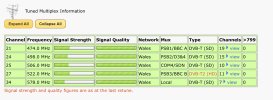
The whole COM5 mix seems missing ..screen snap shot

IMG_2281.jpeg
 
OK …did not understand tunefix. Thought it was something to run to restore channels.
Hopefully I can resolve n/w issue in the morning.
I have confirmed they are installed as I have never configured anything, where can I find what settings are applied ?
 
where can I find what settings are applied ?
WebIF >> Settings >> Settings for Tunefix (seems obvious!)

OK …did not understand tunefix. Thought it was something to run to restore channels.
If you don't understand what it does, why do you have it installed? It's not automatic, you would have to have done it yourself.

Your best bet at this point is to:
  1. WebIF >> Package Management >> tunefix >> Remove
  2. Retune
Now your channels won't disappear.

You should read the documentation, but basically tunefix is specifically for removing the clutter of unwanted services in the tuned set, according to a user-specified formula. That formula might include LCNs, LCN ranges (eg anything 700+, which typically are Internet services which the HDR-FOX can't use and can cause a crash), and string searches (eg "adult"). tunefix can also reallocated LCNs, eg put BBC ONE HD (normally LCN 101) onto LCN 1. One reason for doing all this is that automatic retunes were once rife (while digital TV was being introduced), and anyone who went through their tuned set manually deleting services they didn't want found it tedious.

With tunefix installed and appropriately configured, after a retune and then a reboot the tuned set is restored to your preference, but if the configuration is incorrect or has become outdated you might get some unwanted effects.

tunefix-update is something else entirely. It receives transmitter update information from the CF server and alters the HDR-FOX's tuning database directly, without ever doing a retune. If you retune once, and then install tunefix-update, so long as your HDR-FOX has regular Internet access those little annoyances line a service getting a different LCN or jumping to a different mux (that would normally require a retune) become dealt with automatically, in the background, and not need a retune at all.
 
WebIF >> Settings >> Settings for Tunefix (seems obvious!)


If you don't understand what it does, why do you have it installed? It's not automatic, you would have to have done it yourself.

Your best bet at this point is to:
  1. WebIF >> Package Management >> tunefix >> Remove
  2. Retune
Now your channels won't disappear.

You should read the documentation, but basically tunefix is specifically for removing the clutter of unwanted services in the tuned set, according to a user-specified formula. That formula might include LCNs, LCN ranges (eg anything 700+, which typically are Internet services which the HDR-FOX can't use and can cause a crash), and string searches (eg "adult"). tunefix can also reallocated LCNs, eg put BBC ONE HD (normally LCN 101) onto LCN 1. One reason for doing all this is that automatic retunes were once rife (while digital TV was being introduced), and anyone who went through their tuned set manually deleting services they didn't want found it tedious.

With tunefix installed and appropriately configured, after a retune and then a reboot the tuned set is restored to your preference, but if the configuration is incorrect or has become outdated you might get some unwanted effects.

tunefix-update is something else entirely. It receives transmitter update information from the CF server and alters the HDR-FOX's tuning database directly, without ever doing a retune. If you retune once, and then install tunefix-update, so long as your HDR-FOX has regular Internet access those little annoyances line a service getting a different LCN or jumping to a different mux (that would normally require a retune) become dealt with automatically, in the background, and not need a retune at all.
I appreciate the comment that settings should be obvious, but openly admit I know very little about configuration.
I’m just a user of the box, and initially only installed the custom f/w to get the undelete function and newk folder and the removal of. ‘New’ in file names.
I installed the 2 tunefix packages it (as mentioned above) as in previous issue when whole configuration was being lost, I was advised to install it, so I followed the advice, but have never configured or set anything.
I have removed the 2 tube fix packages …will retune and remove unwanted channels.

I won’t reinstall the packages without trying to understand how to use.

Thank you.
 
Last edited:
The whole COM5 mix seems missing
Looks like Kilvey Hill. Both COM5 and COM6 are missing on channels 22 and 28 respectively.
where can I find what settings are applied
DIagnostics page, File Editor, and there is a link at the bottom of the list to the config. file. Copy'n'paste that in to a [code]...[/code] block here.
It would be helpful to see the aforementioned log file as well, between retune when things are working, and after you've rebooted when they are not (not that you answered that question or some of the others).
 
Kilvey Hill is my local transmitter ... but all channels are OK on TV tuner.
I have removed packages, retuned .... and will report back on if working OK
I will post file you ask for later this morning.
 
Would tunefix cause the entire muxes to go missing though? I'd have thought they would show as present with zero channels.
It depends. There are manual commands to remove entire muxes, but it seems unlikely given the apparent skill level of the poster.
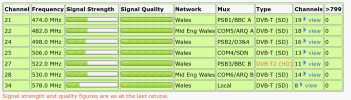
There is something else going on here, as the number of services on the muxes that he has got configured are somewhat fewer than one might expect.
But we're operating on almost zero information.
 
There is something else going on here, as the number of services on the muxes that he has got configured are somewhat fewer than one might expect.
I hadn't noticed that but you're right, in the screenshot they attached the number of channels on most of the muxes is low. PSB3 and Local might be correct but the others clearly not.
 
Surely this discounts that possibility?:

I rescan, check those Ch are definitely there and watchable via PVR.

Then next time I come back to use TV, both channels are again missing in ‘TV guide’. Also any recordings set for Ch. 11 fail.

I rescanned .. same again, both there, then both disappear. Have done this 5 times.
 
It depends. There are manual commands to remove entire muxes, but it seems unlikely given the apparent skill level of the poster.
There is something else going on here, as the number of services on the muxes that he has got configured are somewhat fewer than one might expect.
But we're operating on almost zero information.
The channels have been fully useable until yesterday when they disappeared. Only thing I did was rescan several times (deleting unwanted chnannel via remote) had not connected to webif until late last night.
I have resolved n/w issue can connect to web i/f via PC, was limited to iPad previously.
After removing both tunefix packages and rescan .... channels have stayed working (~just booted up after about 4 Hrs and all still there.)

I can now provide any information asked for ..
Here is update screen grab of Mux 5
Mux info.png
Also attach activity log
 

Attachments

Looks like Kilvey Hill. Both COM5 and COM6 are missing on channels 22 and 28 respectively.

DIagnostics page, File Editor, and there is a link at the bottom of the list to the config. file. Copy'n'paste that in to a [code]...[/code] block here.
It would be helpful to see the aforementioned log file as well, between retune when things are working, and after you've rebooted when they are not (not that you answered that question or some of the others).
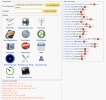
activity log has been attached (previous post) I can't find the 'config.file' on teh diagnostics page .... sceen shot of what is there is attached. Is it under some other name ?

Screenshot Diagnostics.png
 
Back
Top