Sagemcom BT/EE TV Box Pro

Thanks for the reply, unfortunately Topgeezer isn't advertising at the moment, the two above are from SMART HOME & MOBILITY UK
I have tried to find Topgeezer to see if he has any as I have read good reviews about him.
I will pose the question to Smart Home & Mobility in the meantime.
Well the reply from Smart Home & mobility UK was two words "Same thing" not very impressed , no explication why they have two separate listings for the same thing but with different details.
 
What is your main concern - wanting the later EE box? If so just order one and if the BT box comes simply return it under Amazon 30 day return.

That’s why I paid more on Amazon rather than getting cheaper from eBay as Amazon returns are so painless.
 
I think there are two EE Box Pros. One is an oval shape but I think I read somewhere that the rectangular shaped one is the most recent model. I don’t know what the difference is between them though.
 
I think there are two EE Box Pros. One is an oval shape but I think I read somewhere that the rectangular shaped one is the most recent model. I don’t know what the difference is between them though.
The oval box is BT branded and the square box is the latest EE branded box.

They have identical gubbins inside so it’s purely cosmetic choice to make. I chose the EE branded box
 
The oval box is BT branded and the square box is the latest EE branded box.

They have identical gubbins inside so it’s purely cosmetic choice to make. I chose the EE branded box
Blimey, I said just that on the previous page. See post #112

To me the BT one looks a lot nicer than the matt black oblong "brick" of the EE one so that's why I made sure I bought the BT version!
 
I know, I feel like I’m repeating myself as well :D

Like we’ve both said it’s down to personal preference as to what shape you want and if you get sent the wrong one send it back.
 
As far as I can gather the BT and EE (later model) have exactly the same model number and have identical innards - it is just the case and the illuminated logo which actually changed
For any one who is freighting that one of these visual styles may be more suitable for where it is going to be installed, you don't have to be concerned over the colour of the illuminated logo. The software was updated so that the BT branded boxes illuminate the BT logo in a colour more suitable to EE branding rather than BT influenced illumination the boxes used to use.

Well the reply from Smart Home & mobility UK was two words "Same thing" not very impressed , no explication why they have two separate listings for the same thing but with different details.
As an alternative question you could ask the sellers who are selling the BT branded Pro Boxes using just one of the listings is: why they are not maximising their exposure by utilising both listings.
 
Last edited:
Very strange. I was slightly surprised at the number of posts over this. Details are in my copy of the user guide, but looking at the latest EE user guide for the box that detail is not included.
View attachment 7768


If you don't mind forgoing using bluetooth, the old youview remotes for the Humax youview manufactured boxes will work the Sagemcom.
If using the remote described as Humax Retail in this pic then it will have to be set to the default mode 1.
the BT/Plusnet with the large red crosses should be totally avoided. These are a cheap ;ayer veriosn of the BT/Plusnet with the silver navigation button, and they have an issue in that it very easy to press the wrong navigation button instead of the one you are after.
Both the "Humax Retail" and the chunky remote have slightly awkward layouts. For the "Humax Retail" I am suspicious of its longevity.
There as another BT remote which looks similar to the chunky remote, but dosen't include the blue youview (home) button, and that remote will NOT work. If purchasing that look carefully at the pictures as some sellers have been known to misdescribe these remotes.

View attachment 7769
Connecting a keyboard to the Sagemcom box and there are a couple of options dependant on the keyboard. I used to use a wireless min multimedia keyboard and use these. A keyboard also gives direct access to the recordings via F4. Also the I key can be used to display the programme info View attachment 7770


It use to, but that disappeared from the menus, and also changed anyone who had something other than 15 secs back and 1 minute forward to revert back to those times.

If the << and >> buttons on the universal remote can't use along press, or hasn't been setup to do a long press then it won't work.

On a sightly different note, I see that the EE TV basic guide does include how to make larger jumps when playing back recordings. That was omitted on the initial guides for the pro box.
View attachment 7771

If it helps (probably not) the (now very) old Humax RM-F01 Remote Control for Foxsat HDR Freesat Box (available on Amazon) drives the EE/BT Box when in PVR mode (appears to share many buttons with some useful addtions, e.g., |<< and >>| as stated elsewhere). Think I have gone through 5 or more remotes so the boxes certainly seem more robust than the remotes. There is a very similar remote (F04 from memory) that came with the early Freeview boxes, they work just as well although some of the buttons are different.
 
What do you do to your remotes? No-one in my family has broken a single remote control in my entire life.
I don't break them, I wear them out. Like to watch sport which tends to be stop/start so record everything and then hammer the play/ff buttons. The buttons start with sharp edges and eventually become rounded and blank then the micro-switches underneath either fail or need extra hard presses. I bought my Humax Freesat box in 2008 so that's a lot of key presses.
 
I don't break them, I wear them out. Like to watch sport which tends to be stop/start so record everything and then hammer the play/ff buttons. The buttons start with sharp edges and eventually become rounded and blank then the micro-switches underneath either fail or need extra hard presses. I bought my Humax Freesat box in 2008 so that's a lot of key presses.
None of us watch sport. My aunt has worn the text off the buttons on her HDR Fox T2 remote due to pressing them with her fingernails, but it took her 10 years and they still work.
 
Both my 9150T and 2000T original remotes stopped working properly quite quickly. I used a One4All remote to replace the 5000T remote - to stop me pressing a button (Netflix) on the original that caused the box to crash. The original remote is still okay. So far the Aura remote behaves most of the time, although it fails to respond on some presses. I can't tell whether it's a button or comms problem. I don't notice whether the LED illuminates or not until after the remote doesn't work - and the next time I press it works. If only someone made cheap replacement remotes with no moving parts.
 
Both my 9150T and 2000T original remotes stopped working properly quite quickly.
The famous short life of the 2000T remote was behind the reason I mentioned in post https://hummy.tv/forum/threads/sagemcom-bt-ee-tv-box-pro.11770/post-183487 that i was suspicious of the curvy youview remote's longevity. Not just in pictures but looking at the two remotes (2000T's remote and Humax Retail youview remote) they appear to be just a variation of each other. The HDR-1800T's remote appears to have a better track record, although knock-offs of those can be really bad.
 
I don't break them, I wear them out. Like to watch sport which tends to be stop/start so record everything and then hammer the play/ff buttons. The buttons start with sharp edges and eventually become rounded and blank then the micro-switches underneath either fail or need extra hard presses. I bought my Humax Freesat box in 2008 so that's a lot of key presses.
"I wear them out." Of course you do :o_O:

 
I'm guessing there's been no update that's made this product more reliable... I've ditched my EE Pro as every week my recording disappeared and the lack of padding, so wanted to ditch YouView as its feeling dated.

I ideally need to have the ability to record 3-4 programmes, and don't have a dish available.

This box SOUNDS perfect on paper but only seen one positive review, even has 1½ star overall rating on Argos

Thanks
Sorry to hear you had a bad experience with the EE box.

I have now owned two of them - the first I had on a BT TV subscription for two years until Nov 25 and the second one I bought and am using it off contract of course.

The first one was getting a bit flaky, on occasions missing a recording and BT told me if I renewed my contract it "might be possible to replace it " although they could not guarantee that. I politely told them what they could do with their "possibly" and contract!

The new one is working solidly at the moment and it is a shame you can't specify the amount of padding although so far I have only missed the beginning or end of a couple of recordings, so I can live with that.

Is your box on contract or did you buy it? You might have some redress with the supplier?
 
The new one is working solidly at the moment and it is a shame you can't specify the amount of padding although so far I have only missed the beginning or end of a couple of recordings, so I can live with that.
Since accurate record was introduced years ago which in theory negates the need for padding I can’t remember the last time I didn’t get a recording in full. It does happen, but very very rarely in my experience.
 
I bit the bullet and bought a used EE Pro box this week for £75ish, after a painful couple of hours doing updates and factory resets, I finally got it working correctly and test recordings overnight were satisfactory, so it's now in the cupboard as a back up for my aging 5000t.

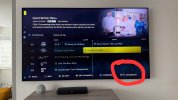
However, I can't find a way to see future dates on the you view EPG, the only way appears to be manually scrolling forward using the right arrow key...is this correct or am I missing something?
 
However, I can't find a way to see future dates on the you view EPG, the only way appears to be manually scrolling forward using the right arrow key...is this correct or am I missing something?
Bottom right of the Guide, use the forward/backward button
 

Attachments

  • bc383104-2543-434f-b563-b552d6c55876_E7995D08-8259-4971-A2C8-6667688816B5.jpeg
    bc383104-2543-434f-b563-b552d6c55876_E7995D08-8259-4971-A2C8-6667688816B5.jpeg
    217.2 KB · Views: 13
Back
Top