Thanks, I don't remember seeing that, but next time I dig it out I'll look closer as it was hooked up to a small bedroom TV at the time...does that bring up a screen with the forward dates on it to select from?Bottom right of the Guide, use the forward/backward button

You are using an out of date browser. It may not display this or other websites correctly.
You should upgrade or use an alternative browser.
You should upgrade or use an alternative browser.
Sagemcom BT/EE TV Box Pro
- Thread starter woodbar
- Start date
Ah okay, sounds like it'll be just as easy to scroll across when setting up a weeks recordings same as I do with the Humax now.No, it simply jumps 24 hours ahead of where you are in the guide.
e.g. from 14:30 today will take you to 14:30 the next day etc.
I have to record morning and early afternoon stuff for 'er indoors, so if I jump a day to where I was with the last evening recordings , I'd still need to scroll back so I find it easier to have the highlight on BBC1 and scroll across, but cheers.I find it’s far quicker to jump a day rather than scrolling all the way through, but whatever you find easiest I guess.
It’s much better implemented than that on the Aura.

EEPhil
Number 28
Reminder.NB – Discussion about the Sagem BT/EE TV Box Pro spawned in this thread has been forked here: https://hummy.tv/forum/threads/sagem-bt-ee-tv-box-pro.11770/
An unnecessary reminder in light of EEPhil's one 2 hour's earlier, and now that it and my posts has been moved here, I would hope I would "get all the answers I might wish for!" if I ask any further questions...Another reminder - the BT/EE TV Box Pro now has its own thread, as shown in the above post so if you start asking questions here you may not get all the answers you might wish for!
OP

woodbar
Active Member
Absolutely.An unnecessary reminder in light of EEPhil's one 2 hour's earlier, and now that it and my posts has been moved here, I would hope I would "get all the answers I might wish for!" if I ask any further questions...
I just doubled up on the reminder as there were still some posts going into the wrong thread - I even put one there not realising I was answering someone who was already in the wrong thread. Does that make sense? I know what I mean!
Anyway, it seems all the errant posts have magically appeared here - so, ask away.


Luke
Well-Knwοn Мember
Do you always examine the schedule in forward chronological order?I have to record morning and early afternoon stuff for 'er indoors, so if I jump a day to where I was with the last evening recordings , I'd still need to scroll back so I find it easier to have the highlight on BBC1 and scroll across, but cheers.
I’d find insisting on examining the schedule in a strict forward chronological order overly involved. There are probbaly a few things I
where I have a touch of OCD, but this isn't one of them.
When I want to achieve the same as you have described, I use the following on repeat:
scroll forward, (picking the programmes I want),
jump forward a day,
scroll backward, (picking the programmes I want),
jump forward a day,
I..e
Day 1: examine the schedule within my time window from the start of the window till the end
Day 2: examine the schedule within my time window from the end of the window till the start
Day 3: examine the schedule within my time window from the start of the window till the end
Day 4: examine the schedule within my time window from the end of the window till the start
Owen Smith
Well-Known Member
I pick what I want to record from the Radio Times. I find the on screen EPG a hopelessly narrow view (HDR Fox T2 user).
Luke
Well-Knwοn Мember
I also find the HDR-Fox T2's epg too restrictive compared to an ideal.I pick what I want to record from the Radio Times. I find the on screen EPG a hopelessly narrow view (HDR Fox T2 user).
Instead, I often use the HDR-Fox T2's custom firmware's epg.
I gave up using Radio Times about 2, or 3, years after it vastly increased the number of recommended programmes. I think that the "recommendation" change was a little before the BBC sold it off. Too much of a flood of programmes that weren't for me, drowning out any which might have been, which no longer appeared to be included in the recommendations .
Kicked myself that it took me almost 3 years to give up on Radio Times, when recommendations had been the prime reason I had bought the Radio Times.
Whatever works for you is fine, as I've been doing my version on my Humax 5000t for a long time I guess that'll be how I use the EE Pro as well...Do you always examine the schedule in forward chronological order?
I’d find insisting on examining the schedule in a strict forward chronological order overly involved. There are probbaly a few things I
where I have a touch of OCD, but this isn't one of them.
When I want to achieve the same as you have described, I use the following on repeat:
scroll forward, (picking the programmes I want),
jump forward a day,
scroll backward, (picking the programmes I want),
jump forward a day,
I..e
Day 1: examine the schedule within my time window from the start of the window till the end
Day 2: examine the schedule within my time window from the end of the window till the start
Day 3: examine the schedule within my time window from the start of the window till the end
Day 4: examine the schedule within my time window from the end of the window till the start
I have just ordered a EE TV Box Pro on Amazon from TopGeezer and he has message me about connecting the aerial before turning on the box, which I was aware of.
I am wondering if I can disconnect the aerial temporarily, to maybe connect back to my Aura for some reason, will I have a problem when I reconnect to the EE TV Box?
Or perhaps I should use a two way aerial splitter to use without touching the aerial to the EE box.
I am wondering if I can disconnect the aerial temporarily, to maybe connect back to my Aura for some reason, will I have a problem when I reconnect to the EE TV Box?
Or perhaps I should use a two way aerial splitter to use without touching the aerial to the EE box.

Black Hole
May contain traces of nut
I suspect that would be OK after set-up, but why not just daisy-chain them?I am wondering if I can disconnect the aerial temporarily, to maybe connect back to my Aura for some reason
Luke
Well-Knwοn Мember
The chunky BT remote came with some of the DTR-T1000s.woodbar said:I have the chunky BT remote which I quite like and it seems to work OK with the BT TV Box Pro BUT it is obviously programmed for the volume control on one of my previous TVs!
Do you happen to know which box these would have come with so I can look up the manual to ascertain the required codes and sequence to set it up with my current LG TV please?
If you can't find the code for your TV you could reset the remote to regain directly use of the volume and mute buttons. I don't think resetting remote was covered in the user guide.
Or try keeping the AD button depressed when using volume or mute buttons. Thiugh for some of the chunky remotes that function of the AD button does not work.
To reset the BT chunky remote:
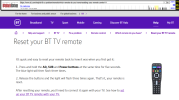
Last edited:
OP
woodbar
Active Member
Thanks for that information very helpful.
I just downloaded a copy of the DTR-T1000 manual but that seems to show a different remote with sort of concave sides? It does not mention programming for TV that I could find either ?
So still stuck for the moment. I will reset it anyway and see what transpires.
I just downloaded a copy of the DTR-T1000 manual but that seems to show a different remote with sort of concave sides? It does not mention programming for TV that I could find either ?
So still stuck for the moment. I will reset it anyway and see what transpires.
Owen Smith
Well-Known Member
That's the original DTR-T1000 remote, I had one.I just downloaded a copy of the DTR-T1000 manual but that seems to show a different remote with sort of concave sides?
Luke
Well-Knwοn Мember
Is that a BT branded version of DTR-T1000 guide?I just downloaded a copy of the DTR-T1000 manual but that seems to show a different remote with sort of concave sides? It does not mention programming for TV that I could find either ?
You need the BT version, not the retail version, although my understanding is that some BT subscribers did get the non-BT remote which had concave sides, I don't know which version of the guide they were given.
Here is the relevent section from a BT version which also includes a diagram of the chunky remote.
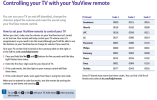
OP
woodbar
Active Member
Very many thanks for that - I will give it a try in the morning.Is that a BT branded version of DTR-T1000 guide?
You need the BT version, not the retail version, although my understanding is that some BT subscribers did get the non-BT remote which had concave sides, I don't know which version of the guide they were given.
Here is the relevent section from a BT version which also includes a diagram of the chunky remote.
View attachment 7786
I did try the reset on it earlier and that resulted in the volume control changing the volume of the EE box and the mute worked similarly so I knew I was getting somewhere!
I am so glad I kept the old remote now as at one time recently, during a clear out, it was in danger of getting binned.