Subtitles not visible!

AyrtomH

New Member
Hi all - recently bought a 2nd hand Humax FVP-5000T and have been recording extensively, intending to save onto USB stick or USB hard drive eventually.
However, when I play back from the stick in the Panasonic TV in the other room, I can't get subtitles. Wife won't watch anything without them. It doesn't seem to make any difference whether the subtitles are switched on on the FVP-5000T box during the recording or not.
Any suggestions gratefully received....
 
When you record a programme it is irrelevant whether subtitles are switched on or not. If, for example, you record BBC1 you could get a video, two audio (normal sound and audio description) and subtitles. If you play back on the 5000T you will be able to access the subtitles - if there were any.
The problem comes when you want to transfer the files elsewhere. Subtitles cannot easily be transferred from one video format to another, in my experience. How are you saving a recording to USB? What is the file type that you have saved? If the type is .ts you have a possibility of the subtitles being saved, but it wouldn't surprise me if the TV can't play it. If the file type is anything else there's a good chance the subtitles have been lost.

Whenever I've tried to save a recorded programme with subtitles it has involved a lot of work on a PC. Are you prepared to do that?

The easiest solution, and one you may not like, is to connect the 5000T to the Panasonic - providing you have an aerial outlet in that room.
 
The subtitle stream might not have been included in the export. A media inspector should reveal what's on the stick.
 
When you record a programme it is irrelevant whether subtitles are switched on or not. If, for example, you record BBC1 you could get a video, two audio (normal sound and audio description) and subtitles. If you play back on the 5000T you will be able to access the subtitles - if there were any.
The problem comes when you want to transfer the files elsewhere. Subtitles cannot easily be transferred from one video format to another, in my experience. How are you saving a recording to USB? What is the file type that you have saved? If the type is .ts you have a possibility of the subtitles being saved, but it wouldn't surprise me if the TV can't play it. If the file type is anything else there's a good chance the subtitles have been lost.

Whenever I've tried to save a recorded programme with subtitles it has involved a lot of work on a PC. Are you prepared to do that?

The easiest solution, and one you may not like, is to connect the 5000T to the Panasonic - providing you have an aerial outlet in that room.
Thanks for that Phil, even though it's not great news. This was going to be my solution to taking TV shows to a holiday home, on USB stick rather than a cake-box of DVDs (which customs love...)
In answer to your question, it looks like the files are save as single .mpeg files, whether I save them directly on a stick in the back of the box, or via the network direct to my PC laptop. I haven't spotted any option to save different file types.
Annoyingly (or fortunately?), my Panasonic DVD recorder transfers saved shows to blank DVD giving an option as to whether to include subtitles or not, but it won't record to USB stick! I might try a USB hard disk on it....
My brother has retrospectively added subtitles to shows streamed via (I think) Popcorn? on the PC and has had some success. What's your method?
Thanks again...
 
Last edited:
my Panasonic DVD recorder transfers saved shows to blank DVD giving an option as to whether to include subtitles or not, but it won't record to USB stick! I might try a USB hard disk on it....
I guarantee you that will not work.
 
Any suggestions gratefully received....
Get a second hand HDR-FOX instead. Internally, recordings are the broadcast TS including the subtitle stream, and remain TS when exported to USB. Install the custom firmware and you can do almost anything.
 
I need to do some testing on my rarely used 5000T to see if there are easier ways.
In outline (I may provide better details later), it involves saving a decrypted version of the recording to a computer. This requires the computer and 5000T on the same network and the Humax's Media Server turned on. Free software called Media Monkey should be able to access the files on the Humax and fool it to stream them - whilst recording them to your computer. These should be the .ts files. If your TV could play them and recognise the subtitles then no further work required. If not, you would need to rip the subtitles from the .ts file - Subtitle Edit (also free) should be able to do this and produce a text file (usually .srt) with the subtitles. Using ffmpeg (free) it should be possible to convert the .ts recording to mkv format and add the subtitles. That single file might play on a TV and the subtitles might be recognised.
my Panasonic DVD recorder transfers saved shows to blank DVD giving an option as to whether to include subtitles or not, but it won't record to USB stick! I might try a USB hard disk on it....
I guarantee you that will not work.
So do I.
DVDs can be a sod to rip. You need to overcome any protection. If you can you can create a DVD image on your PC. Subtitle Edit can rip the subtitles. You would need some software that can convert individual episodes to another (mkv?) format.
and remain TS when exported to USB. Install the custom firmware and you can do almost anything.
But can you export subtitles to srt files (if the OPs Panasonic won't play .ts files)?
 
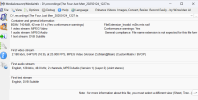
I have just completed my first test. I saved a recording from the 5000T to a USB stick - by going into Recordings, selecting a programme, pressing + and selecting copy. The recording appears on the USB stick in the .recordings directory (folder). Using MediaInfo the .ts file shows:
Screenshot 2026-05-21 101653.png
There are subtitles. My TV will play the .ts file but does not recognise the subtitles.

Therefore, I would need to rip the subtitles as indicated above. Convert the .ts into (probably) Matroska (.mkv) format. Then I could either add the subtitles to the video (multiplex the video, audio and subtitles into one file), or try saving the video/audio (.mkv) file and the subtitles (.srt) to a USB stick* and see if that works. (* needs to have the file prefix for the .mkv and ,srt the same - eg. Just4.mkv and Just4.srt)
 
Last edited:
This was going to be my solution to taking TV shows to a holiday home
Get a second hand HDR-FOX instead. Internally, recordings are the broadcast TS including the subtitle stream, and remain TS when exported to USB. Install the custom firmware and you can do almost anything.
...and then have an HD-FOX (or another HDR-FOX) at the holiday home for playing the recorded content without any restrictions on accessing subtitles or whatever.

If you actually use two HD-FOXes (one to record, the other to play back), you could even record direct to a USB hard drive and just take that with you. A small amount of CF jiggery-pokery is required to make that all work seamlessly.
 
There are subtitles. My TV will play the .ts file but does not recognise the subtitles.
I imported the .ts file into Subtitle Edit and let it use OCR to create an srt text file with the subtitles in. If I place that next to the .ts file on a USB stick I get subtitles when playing the recording on my TV (from the stick, obviously).

Combining post #8 and this and using the free Subtitle Edit could solve the OPs problem.
 
As the subtitle stream is a video overlay, I imagine you could simply run the recording through an incantation of FFMPEG to combine it with the video stream.
 
I have to agree with Black Hole. Given what @AyrtomH is trying to do, a pair of HDR Fox T2s will just work. Record on one at home, use the Humax onscreen UI to copy the recordings to a USB stick (formatted Ext2 ideally so files can be larger than 4GB without being truncated), take the USB stick on holiday, stick it in the other HDR Fox T2, and just play the recordings. They can either be played direct from the USB stick or copied to the internal hard disc of the other HDR Fox T2 and played from there. You could also make recordings in the holiday home (depending where it is) and use the USB stick to take them back home with you.

Caveat: HD channel recordings are encrypted by default and the other box won't be able to play them. Using the custom firmware on the HDR Fox T2 gives multiple solutions to that. Primarily you can configure the HDR Fox T2 to decrypt all recordings as they are made; or you can install a CF package that clears the flag preventing decryption and the files will be decrypted as they are copied to the USB stick; or you can set the encryption keys of the two boxes to the same value and they can then play each other's encrypted HD recordings.

I regularly transfer recordings between my house and my parents HDR Fox T2s this way. It's easy peasy.
 
The holiday home is apparently abroad - see mention of "customs" - so your solution, whilst very good, would appear to be impractical.
 
I don't think it would be too hard to organise a HD-FOX at the destination, and the benefit of using HD-FOXes (no internal HDD, record to external media only) is that recordings are immediately transportable without having to transfer or process them in any way.
 
I don't think it would be too hard to organise a HD-FOX at the destination, and the benefit of using HD-FOXes (no internal HDD, record to external media only) is that recordings are immediately transportable without having to transfer or process them in any way.
The original post is asking about recordings from a FVP-5000T.
The advantage of using the FVP-5000T over an HD-FOX, is that the FVP-5000T is far more flexible for everyday use.

A down grade of that flexibility does not suit everyone.
 
The original post is asking about recordings from a FVP-5000T.
The advantage of using the FVP-5000T over an HD-FOX, is that the FVP-5000T is far more flexible for everyday use.

A down grade of that flexibility does not suit everyone.
The original poster has a specific use case, and for that use case the HDR Fox T2 is far easier to use. Whether they value your claimed extra flexibility of the FVP-5000T is unknown since they have not stated in this thread. Personally for me the HDR Fox T2 plus custom firmware does everything I need from a Freeview PVR, what more does it need to do? I use an Apple TV 4K for my streaming needs.
 
I don't think it would be too hard to organise a HD-FOX at the destination, and the benefit of using HD-FOXes (no internal HDD, record to external media only) is that recordings are immediately transportable without having to transfer or process them in any way.
I don't see any issue exporting either an HDR Fox T2 or HD Fox T2 to the destination, unless it's somewhere obscure. Even if it's somewhere with 110V mains that can be accommodated with a mains transformer.

What issues are there setting up an HDR Fox T2 or HD Fox T2 without an aerial? I'm aware there's something but can't remember what. Do you need to set it up in the UK and then export it, leading to problems if it does a setup wizard reset? (which mine never do).
 
Back
Top