Subtitles not visible!

All the Humax devices from the Foxes to the Aura record with subtitles. The Foxes to the 5000T will effectively save the same file to USB. The fact that some AI answer says you can save to a USB with subtitles is correct, but it won't help you. If the TV won't play subtitles from a file saved from a 5000T it is unlikely to play one from a HDR Fox T2. If you can't go down the route suggested by Owen in the previous post then you either have to bite-the-bullet and "hack the files" or give up and go back to your previous method.
 
Don't believe any of that $h!t. It just makes it up.
I might have said that, but didn't. In this case I believe it to be correct. Based on my use of the 2000T - which appears to me to be a locked down version of the Foxes - a programme saved to USB is decrypted and carries all the streams recorded. That could be video, two audio and subtitles. So the AI slop would be correct.
The problem is the OP's TV can't recognise the subtitles in an m2ts file (neither can my TV).
 
An HD Fox T2 might be able to play files saved by the 5000T, assuming they're not encrypted ie SD recordings.
I've tried to play the TS file I saved from a 5000T (in an earlier answer) on a 2000T. It will play but I can't access the subtitles. Unless you can create the sidecar files to make it look like a native recording you're stuffed. So I used sidecar (there is a version that will run on a Windows PC). Bingo! Therefore I expect if you pass a TS file from a 5000T (the OP says that they are mpeg, mine are TS) through sidecar and create the hmt and nts files they ought to work on one or both of the Foxes. Of course, the caveat being Standard Definition only. (Not sure whether U&Eden, Legend Xtra, 5Select and TBN UK off the DVB-T2 multiplex will work in sidecar).
 
Last edited:
Of course, the caveat being Standard Definition only. (Not sure whether U&Eden, Legend Xtra, 5Select and TBN UK off the DVB-T2 multiplex will work in sidecar).
Sidecar on the T2 works for HD services (MPEG 4), so I see no reason why not (but I haven't tested any of those you listed).
 
@AyrtomH Are you able to add a box like the HD Fox T2 at the holiday home for playback of the recordings? You mention playing DVDs now so perhaps a playback box at the holiday end is possible? Your options change a lot depending on this.
Thanks Owen - the other spot has a Pana DVD HD recorder/player like the one at home plus a Pana smart-ish TV which plays happily from USB - currently I guess those are my 2 options, plus USB HD?? Unfortunately neither DVD unit records to USB which would have sorted it. Which makes me wonder...
ps can't believe you guys on here have taken the time to contribute THREE PAGES (so far) of replies to my dumb-ass query, and not a troll amongst you even if it's occasionally got a bit spicy - thank you all! You'll have realised by now that I'm looking for a quick fix here and am not really interested in complex (for me) file manipulation on the PC. But I WILL have a look at 'Sidecar'.
 
Last edited:
Thanks Owen - the other spot has a Pana DVD HD recorder/player like the one at home plus a Pana smart-ish TV which plays happily from USB - currently I guess those are my 2 options, plus USB HD?? Unfortunately neither DVD unit records to USB which would have sorted it. Which makes me wonder...
What I'm asking is can you take (or post) an HD Fox T2 to the holiday home and leave it there so it is at the holiday home for you to use going forwards.
 
Is it not a waste of effort having a HD Fox T2 at the other end to playback recordings with subtitles?
If the HD Fox T2 playback is anything like the HDR Fox T2 playback implementation then the subtitles will go out of sync during playback.
 
Is it not a waste of effort having a HD Fox T2 at the other end to playback recordings with subtitles?
If the HD Fox T2 playback is anything like the HDR Fox T2 playback implementation then the subtitles will go out of sync during playback.
We don't currently know if they are out of sync enough for this to be a problem for the original poster. A few seconds out might be acceptable, a few minutes out likely would not be. I don't know how far out of sync they can get. Buying an HD Fox T2 and trying it at home would determine if the sync is acceptable to the original poster.
 
Struggling here with Quotes and Multi Quotes, but Owen asked:
"What I'm asking is can you take (or post) an HD Fox T2 to the holiday home and leave it there so it is at the holiday home for you to use going forwards"
- what I haven't said above is that the 'other spot' is in Australia and we are lucky enough to visit most years. So, correct me if I'm wrong, I'm pretty sure the reception frequencies would be all wrong Down Under, plus there's the issue of transport in the first place.
Also I seem to have missed the objective of having a Fox at each end.... ah wait - install the custom firmware and watch that way at the other end? Makes sense
Still hoping for a 'quick fix' but hope is fading fast! :(
 
I'm pretty sure the reception frequencies would be all wrong
That wouldn't matter as you wouldn't be using it for recording, only playback.
Still hoping for a 'quick fix' but hope is fading fast! :(
Take a VHS tape.

It's dreadful how no manufacturer seems to be able to play what ought to be a standard format unless it was recorded on their own particular box. You would have thought the digital revolution would've made this easier, but it has seemingly made it harder.
Why can UK TV's receive transport streams off-air OK, but then are seemingly unable to play them back if recorded on to some removable format? They always seem to want something different, but make it hard for the users to know what. It beggars belief really how the grand fromages in the industry can make such a pig's ear of it all.
 
other spot' is in Australia
For transportation reasons your original idea of wanting to put some recordings on a USB stick has some merit. Might need to have a large capacity though. Unfortunately I can't see a way of getting subtitled programmes that will play on a TV from the stick without converting the file format and probably hard-coding the subs.
 
Why can UK TV's receive transport streams off-air OK, but then are seemingly unable to play them back if recorded on to some removable format?
Some TVs allow you to record what you are watching (at least SD) to a USB stick. Others, like the one I used for testing don't, they only allow playback. I need to check whether that makes a difference to showing the subs.
Of course the broadcasters don't want you to record on one device and play on another. what they really want is for you to record nothing and stream everything.
 
I need to check whether that makes a difference to showing the subs.
For what it's worth, my test recording saved from my 5000T to a USB stick would not play with subtitles on a Samsung TV (no record to USB).
My cheap Bush second TV (can record SD) will play the test recording with subtitles!
 
Thanks one and all. Re all of the above, some points for clarification:
Equipment in the UK is a not-so-new smart-ish Panasonic TV, A Panasonic HD / DVD recorder/player and the recently purchased Humax FVP-5000T.
In Australia, ditto the 2 Panasonic units above (and I could probably find VCRs at both ends, in the loft, as suggested above - hopefully tongue-in-cheek...)
I do have an option of record to USB on the 2 Panasonic TVs, (but USB HD only), BUT - it only works in real time i.e. the programme must be live, on & viewable, so pretty inconvenient - PLUS - I think it's encrypted to the particular machine...
I'm not trying to rip DVDs, DVD-Rs have been my fully functioning solution to the subtitles issue - I get an option to include them when recording from the recorder to the DVD. BUT they are bulky, and (as one customs woman in Hong Kong said last year as she examined a cake-box full, complete with rubber gloves on - "you still have a machine which can play these??") awkward. Hence my purchase of the Humax unit, which isn't fulfilling its promise.
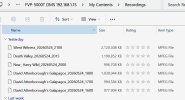
If I record from the Humax to my networked PC I get .mpeg files - see the screenshot. I will record something direct to USB stick again to check which sort of files that results in, but the one time I did it I thought they were also .mpegs.

Once again, I have a solution which works - I was just looking for a more convenient way to do it. Re Phil's last comment, I'll have to try USBs on more TVs. (Phil - were subtitles ON during recording??)

1779731484567.jpeg
 
I'm pretty sure the reception frequencies would be all wrong Down Under, plus there's the issue of transport in the first place.
Doesn't matter. Tune it once in the UK (because with no channels tuned the box won't do anything) and then take it to Australia as a playback only device. Just hope it never goes back into the install wizard because that loses all the channels. HD Fox T2 makes a lot of sense for this as it is smaller, and none have ever been observed going back to the install wizard.
Also I seem to have missed the objective of having a Fox at each end.... ah wait - install the custom firmware and watch that way at the other end?
You don't need the custom firmware in Australia. Provided the recordings are not encrypted the HD Fox T2 will play them. @EEPhil are the SD recordings from the 5000T copied to USB encrypted? If you want to take HD recordings, probably easiest to get an HDR Fox T2 and install custom firmware so you can set it to decrypt the HD recordings (either as recorded or decrypt on the fly when copying to USB), or you could set its encryption key to the same as the one the HD Fox T2 uses.

Be careful with USB stick formats. Long HD recordings (anything much over an hour) can easily exceed 4GB so won't fit (or will get truncated) on a FAT USB stick. By default the Humaxes will not handle exFAT, not sure about FAT32 can't remember. It is better format the USB stick to a Unix filing system which is the Humax native format, Ext2 is advised as it wears out the flash less. Set the cluster size large enough that files well above 4GB in size will be accepted, the default does not always do that. I use an EaseUS PC utility to do the formatting, it can probably also be done on an HDR Fox T2 or HD Fox T2 from the command line once custom firmware has been installed.

Beware also copying to USB stick is not quick, you'd need to allow enough time for the copy. And you're going to need a big USB stick, but those exist these days.
as one customs woman in Hong Kong said last year as she examined a cake-box full, complete with rubber gloves on - "you still have a machine which can play these??"
I have 6 machines that can play DVDs. Three Oppo 203s (my 4K player and two spares, used in rotation), an Oppo 95 for HDCDs and SACD-R, a Pioneer DVD Recorder my brother gave me that I occasionally use to archive a VHS tape, and an Arcam DV-137 DVD-A/SACD player in the loft. I also have a Panasonic 950 S-VHS deck that still works in my main rack.
 
Last edited:
Back
Top