Subtitles not visible!

Although this does not directly allude to the title of the thread, can I offer a couple of recent observations made as I'm getting used to the 5000T?
Downloading a saved file/program from the Humax to the PC via the wifi network produces a single .mpeg file and takes a few minutes.
However, downloading/copying a program directly from the Humax to USB using the Copy function, produces a .ts file plus 3 other small, similarly named files (.nts; .hjsm & .hjm) - but, crucially, it seems to take even longer to copy than the play-time of the program, even though the .ts file is smaller than the .mpeg?
 
The USB ports on some of the Humaxes (to my knowledge, 2000T and 5000T) are painfully slow. It's possible the rear USB might be faster than the side one. Worth a try - but probably a waste of time.
I can't try your method of copying "via wifi", just doesn't work for me. Have you tried playing the mpeg files in VLC? Can you display subtitles? If it's quicker and it works I'd use that method.
 
Phil - I didn't know I had a side USB port, I'll have a look. Anyway I'm using the rear one with a USB extension lead.
Re wifi, I'm able to save recordings direct from the Humax to my Win 11 laptop using the domestic wifi network - a 1hr programme takes about a minute - but oddly, NOT to the remote Win 10 desktop upstairs via wired Powerline adapters/ Long Reach Ethernet (LRE/VDSL) extenders/ 'through-the-earth-wires' range extenders? Everything else works seamlessly through these at my max d'load speed of 70-odd mbps. The Win10 PC sometimes shows the Humax icon but it won't open.
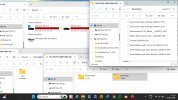
The image below shows the File Explorer architecture of the Humax recordings as seen on my laptop - read from top left, anti-clockwise. (Please excuse the red 'Disks Full' - I've just ordered some more memory, from Temu of course).
I'm using drag-and-drop in Win11 to transfer files from Humax to PC - nothing clever (FTP?)

1780145519817.jpeg
 
The point is whether the drag and drop mpeg files are playable with subtitles in VLC.

No need to waste time with the side USB, the rear one, if there is a difference, might be faster.
I'm using drag-and-drop in Win11 to transfer files from Humax to PC - nothing clever (FTP?)
Unlikely to be FTP. FTP would give you the files as on the Humax disk - encrypted and unplayable.
I'll have to try again with my W11 PC and see if it'll recognise my 5000T.
 
Phil - as suggested in lucky post #100, VLC will play and show subtitles on both .ts files copied directly from the back of the 5000T onto USB, and .mpeg files downloaded from the Humax onto the laptop, via the wifi network connection - both were programmes previously recorded onto the 5000T HD.
(I just checked an .mpeg again) - Result!
 
Then I wouldn't waste time with the USB in the 5000T.
For some reason my Win11 computer starts Windows Media Player (Legacy) whenever I click on the 5000T Media Server - and no change in any settings has helped. The player can't find any files so I can't get the mpeg files to check why they are larger. (I have other ways to get the recordings if I want to)
 
It doesn't show up in 'My Computer / This PC' as per the image above??

Weirdly I've just discovered mine shows up even when the Humax is 'Off" - haven't tried copying in this state yet...
 
It doesn't show up in 'My Computer / This PC' as per the image above??
Not on my computer. I don't think I've changed anything relevant on it. I'm curious a to why it doesn't work. But not curious enough to spend any more time trying to find out why.
Weirdly I've just discovered mine shows up even when the Humax is 'Off" - haven't tried copying in this state yet...
Not a problem, a feature.
 
But not curious enough to spend any more time trying to find out why.
Possibly cracked it. I've been starting the Explorer style thingy and navigating to This PC rather than using the This PC app. With the app I can certainly see one of my other Humaxes in the way you do. Files transfer as mpeg. MediaInfo shows some errors and the subtitles don't play in VLC. :frantic:. As you were, I was looking at an early episode of new Mock the Week - no subs. The following repeat of previous episode has subs. Phew!
 
The USB ports on some of the Humaxes (to my knowledge, 2000T and 5000T) are painfully slow. It's possible the rear USB might be faster than the side one. Worth a try - but probably a waste of time.
The USB ports of the older HDR Fox T2 are slow also. But what I have noticed is if I copy a recording that is already decrypted it is merely slow (a few minutes to copy) whereas if the HD recording is still encrypted (a new recording) then it takes forever (eg half an hour for a one hour recording), I assume because it is being decrypted on the fly as it is copied to USB. Decryption only possible because I'm running custom firmware.

Does the 5000T encrypt all recordings including SD? (unlike the HDR Fox T2). If so it's going to have to decrypt them on copying.
 
The HDR Fox T2 encrypts everything. So presumably you meant to write "... (like the HDR Fox T2)."
Having never owned an HDR-Fox-T2 I wasn't in a position to challenge the "unlike the..." . From what I've read on here something didn't sound right.
 
Shouldn't it be possible for me to copy an SD recording from my 5000T onto a USB stick then plug it in and copy it onto my other 5000T in another room? and yet it doesn't seem to work...
 
My understanding is that on the 5000T, only HD recordings are (un-breakably?) encrypted, SD not so.
Otherwise surely I would not be able to watch files downloaded directly to PC, as above, transferred in seconds i.e. not de-cripted on-the-fly?
BTW I think 'This PC' through File Explorer and the "This PC app" are the same thing, no?
 
Shouldn't it be possible for me to copy an SD recording from my 5000T onto a USB stick then plug it in and copy it onto my other 5000T in another room? and yet it doesn't seem to work...
That really depends on how you are trying to do it. It isn't something I can test as I don't have two 5000Ts.
With the USB drive plugged into second 5000T does the recording show up in the recordings section (possibly listed separately under the USB device name)? If so, is it playable?

Background: (An explanation of what works. "Do not try this at home"!)
If you have saved to a USB stick from the menu on the 5000T the recording is saved to the ".recordings" directory (folder) on the USB.
If, with no USB drive inserted, you delete the original recording from the original 5000T HDD and then insert the USB drive (in the original 5000T), somewhere in the recordings list the saved recording should be available and play.
However, I don't know whether somewhere in the recording's files (probably .hjm file) the serial number of the recording machine is noted, If it is that might prevent the playback on another machine even if the .ts file is decrypted.

Possible solutions:
If the two 5000Ts are connected to the same network it ought to be possible to play the recording that is on device 1 over the network on device 2.
Alternatively, you can plug the USB drive into a PC and copy or move .ts files from the .recordings directory and put them in another folder or the top level (do not start folder name with ".")
Then, when plugged into Humax 2, the .ts files should be visible, available to copy and playable from the "Media" section of the menu. The recording will not behave like a native recording - no EPG data stored, no subtitles displayed (even though they exist in the file).
 
BTW I think 'This PC' through File Explorer and the "This PC app" are the same thing, no?
You'd think so. If I double click on "This PC" then yes. If I expand under "This PC" the Humax isn't seen. If I look under "Network" I can find it but it opens wrongly.
Turns out double clicking on "This PC" in the File Explorer achieves the goal. I just wasn't doing that!
 
Don't ya just love Windoze. Is this some sort of confusion between DLNA and SMB that they are deliberately hiding to make things "easier"?
Maybe there's a way to monitor what it's actually doing using netstat at the command line, filtering by IP using find, while trying the various operations.
 
Shouldn't it be possible for me to copy an SD recording from my 5000T onto a USB stick then plug it in and copy it onto my other 5000T in another room? and yet it doesn't seem to work...
My understanding from discussions I have previously read on the old Humax forum is that recordings made on a 5000T, SD or HD, can only be played back on the same machine. But I may not have remembered it accurately.
 
Back
Top