Update from android 9 to 14 - problem

I've just used yt-dlp to download what is supposedly a 5.1 test, it isn't, it is 2 channel stereo. Looks like YT doesn't support 5.1, unless there are additional audio tracks available that I can't see - probably at a premium rate. Not an Aura problem then.
I can play 5.1 clips on YouTube on my Apple TV 4K Gen 3, and my home cinema amp shows LPCM 5.1 (Apple TV 4K decodes everything to LPCM sadly). All the sounds in YouTube test tracks come out of the correct speakers. I don't have YouTube Premium, I'm just using it for free.
 
Get it on your TV, click on the Settings icon on the right and make sure Audio is set for Surroud Sound 5.1.
No point, I don't have surround sound. Looking at that item on a yt-dlp based app on my phone (Seal) only gives 2 channel audio. I'll have a proper look later when I get my pc up and running.
 
I have numerous wild life camera streams that are modulated to spare channels on to the Freeview transmission eg. 101 BBC1, 102 BB2, ITV 103 … 110 Garden1, 111 Birdbox1, 112 Birdbox2 etc

This is distributed so I can view them on any TV in the house as they are just part of my Freeview signal.

It all worked fine until late last week when the Humax Aura installed an Android update.

The standard Freeview channels seem to work ok but the additional bespoke channels have sound but no video ie. the screen is just black.

Anyone got any ideas?

Cheers
 
Re 5.1 on YouTube.
Looking with a proper version of yt-dlp gives me a few options, 6-channel AC-3 Dolby Digital, 6 channel E-AC-3 Dolby Digital Plus and an unplayable IAMF coded file.
 
Probably not, but if you have spares lying around why not try.
Since updating have you done a full power cycle.
Long press on the remotes power button, select OK on screen.
Give the box a few minutes to fully shut down so the HDD can save data and fully spin down.
Unplug.
Wait a couple of minutes.
Plug back in.
Box should start automatically,
Humax logo.
Android start up screen.
Blank screen for a minute or two.
White rotating circle as the Humax OS starts up.
After the box starts up and waiting a few minutes for everything to load and settle try and see if that has fixed your audio issues.
Still need some advice please, only getting sound thru TV speakers...
 
I have numerous wild life camera streams that are modulated to spare channels on to the Freeview transmission eg. 101 BBC1, 102 BB2, ITV 103 … 110 Garden1, 111 Birdbox1, 112 Birdbox2 etc

This is distributed so I can view them on any TV in the house as they are just part of my Freeview signal.

It all worked fine until late last week when the Humax Aura installed an Android update.

The standard Freeview channels seem to work ok but the additional bespoke channels have sound but no video ie. the screen is just black.

Anyone got any ideas?

Cheers
Shut down the aura and when fully off , disconnect from the power for 10 Mins to be sure and power up again and give it time to reboot and sort its self out.
Then turn on and see the results.
I had different black screen issues but that fixed some of them and is relatively painless to do.
But it does add another variation to the issues seen.
 
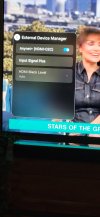
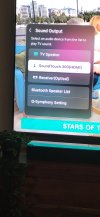
To get sound to switch from tv speakers to my soundbar, on my samsung tv (your tv may have a slightly different menu settings system) in tv settings i scroll down to general a privacy and select external device manager toggle any net hdmi CEC to on then exit to sounds and highlight the surround sound device and press ok.
 

Attachments

  • 20261118_103940.jpg
    20261118_103940.jpg
    821.2 KB · Views: 7
  • 20261118_104045.jpg
    20261118_104045.jpg
    915.9 KB · Views: 7
Home cinema via HDMI (Aura Audio Equipment TV) (Up to 7.1 ch)

Seems when I plug the hdmi cable direct into the soundbar it works but doesn't work when plugged into another HDMI port....mmmmm
 
Home cinema via HDMI (Aura Audio Equipment TV) (Up to 7.1 ch)

Seems when I plug the hdmi cable direct into the soundbar it works but doesn't work when plugged into another HDMI port....mmmmm
I have hdmi from humax box to tv, then soundbar from hdmi arc to tv hdmi arc humax box i have it on custom m12 transcoding off surround sound auto lipsync minus 100 mls
 
Home cinema via HDMI (Aura Audio Equipment TV) (Up to 7.1 ch)

Seems when I plug the hdmi cable direct into the soundbar it works but doesn't work when plugged into another HDMI port....mmmmm
Mine too Home Cinema via HDMI Aura Audio Equipment up to 7.1.
and transcoding off.

Aura connected to AVR, AVR connected via eARC on AVR to eARC on TV.
 
I have hdmi from humax box to tv, then soundbar from hdmi arc to tv hdmi arc humax box i have it on custom m12 transcoding off surround sound auto lipsync
  • Input Locking: When you plug the Humax directly into the soundbar's HDMI In port, the soundbar switches itself to that specific input.
  • Lost TV Audio Return: While the soundbar is locked onto its own HDMI In port, it stops listening to the ARC (Audio Return Channel) coming down from your TV. Even when you switch your TV screen to the DVD player, the soundbar stays stuck on the Humax audio until you manually change the soundbar's input with its own remote.
The Best Wiring Setup
  • Humax to TV: Plug the HDMI cable from the Humax into a standard HDMI port on your TV (e.g., HDMI 1).
  • DVD Player to TV: Plug the HDMI cable from the DVD player into another standard HDMI port on your TV (e.g., HDMI 2).
  • TV to Soundbar: Run one HDMI cable from the TV's port labelled HDMI ARC (or eARC) to the soundbar's HDMI Out (TV-ARC) port.
Benefits of This Setup
  • Automatic Switching: Whenever you switch between the Humax, the DVD player, or built-in TV apps using your TV remote, the TV automatically sends the right sound straight to the soundbar.
  • Single Remote Volume: Because everything runs through the ARC connection, your TV remote will usually control the soundbar's volume automatically without needing a second remote.
 
No, as stated audio passthrough is on on my TV, the AVR is set to Auto so it will detect the source and output it accordingly.
There are You Tube videos I found where you can select Surround Sound 5.1

Have a look at this one,

Get it on your TV, click on the Settings icon on the right and make sure Audio is set for Surroud Sound 5.1.

I've got to go home for my tea now, but I might
be able to come out and play tomorrow.
Sorry my mum had already called me in for mine hence the slow response. To be honest I cannot be arsed to try it, I have only ever used my TV as a monitor so its lists and features lack any muscle memory and I only get TV audio to my Denon via optical so all a bit of a faff. I will take your word for it. A bit more searching has not helped with further results on both sides of the fence. However I am now of a mind after reading that Google says you can in the below article that you can but maybe not via a browser or some devices. If this is the case maybe whatever permission made it work before for you got removed by the update, of course I could be totally wrong.

 
I'm still wondering if the Aura is shutting down properly?
I recorded a couple of programmes last night, recording had started when I turned the box off but as I found with the .59 update, I don't turn it fully off like I used to (holding the power button and shut down) as it literally shuts the box completely off and stops any recordings taking place, so I now press the power button on the remote once but I heard it whirring this morning again, which means it is on.
I'm not recording anything for a good few hours later on today.
Should it be on like this? I'm wondering if after the recordings had ended it did not turn itself off?
I've not had much feedback on this.
Has anyone else found the Aura on (you can you hear the hard drive spinning) when it shouldn't be?
 
Back
Top