• The forum software that supports hummy.tv has been upgraded to XenForo 2.3!

    Please bear with us as we continue to tweak things, and feel free to post any questions, issues or suggestions in the upgrade thread.

Cloning/Fixing Failed HDD

I think the MBR on the Humax is fairly simple.
I don't think the HDR populates the MBR with boot code, so it may be 440(?) bytes of 0x00, followed by the disk ID, partitions etc.

In this instance and in Linux, you can view/check the MBR which is the first 512 bytes (aka LBA0) of a drive by
hexdump -Cn 512 /dev/sdX


Be very careful if you amend it as you can can easily corrupt your partition table.

Code:
humax# hexdump -Cn 512 /dev/sda
00000000 00 00 00 00 00 00 00 00 00 00 00 00 00 00 00 00 |................|
*
000001c0 09 00 83 fe 3b 82 08 00 00 00 b7 1c 20 00 00 fe |....;....... ...|
000001d0 3d 82 83 fe ff ff c0 1c 20 00 df 0a d8 38 00 fe |=....... ....8..|
000001e0 ff ff 83 fe ff ff a0 27 f8 38 9f 24 40 01 00 00 |.......'.8.$@...|
000001f0 00 00 00 00 00 00 00 00 00 00 00 00 00 00 55 aa |..............U.|
00000200
humax# hexdump -Cn 512 /dev/sdb
hexdump: /dev/sdb: No such device or address
humax# fdisk -l /dev/sda

Disk /dev/sda: 500.1 GB, 500107862016 bytes
255 heads, 63 sectors/track, 60801 cylinders
Units = cylinders of 16065 * 512 = 8225280 bytes

   Device Boot  Start End     Blocks     Id System
/dev/sda1       1     131     1052251+   83 Linux
Partition 1 does not end on cylinder boundary
/dev/sda2       131   59495   476841327+ 83 Linux
/dev/sda3       59495 60801   10490447+  83 Linux
humax# ls /media/My\ Video/
humax#
 
Last edited:
I don't think the HDR populates the MBR with boot code,
There is no boot code. The loader is in flash memory, as is the kernel and root filesystem. How would the machine boot with a blank disk otherwise?
so it may be 440(?) bytes of 0x00, followed by the disk ID, partitions etc.
446 bytes of 0, 64 bytes of partition table and 2 bytes of marker. A "disk ID" is something you seem to have invented.

It's amazing how he seems to implicitly trust all the other tools he's been using, and random opinions about stuff from random places on the internet (be careful quoting those links, just in case...), but won't trust anything said here or developed here, even though here would be an authoritative source if he were looking from the internet without previously knowing about here.
The fixdisk script is just plain text, which anyone can read, and just invokes standard tools (which he presumably won't trust either). It's border-line irrationality. And what has he got to lose by this lack of trust anyway? Not a lot that I can see.
 
In this instance and in Linux, you can view/check the MBR which is the first 512 bytes (aka LBA0) of a drive by
hexdump -Cn 512 /dev/sdX
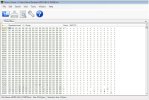
The contents of LBA 0 from one of my two working HDDs (as read by DMDE and displayed by Binary Viewer) begin with a run of 0x00 (440 of them) and end with 0x55AA (2-byte signature/marker) which is consistent with what my research has turned up. I’m very pleased with what I’ve achieved so far – cloning the failing drive and repairing 7 of the sectors that didn’t copy across – and all the signs are that with just that LBA 0 to fix I’m in a good place. A second brand new 1TB HDD has just arrived so I think I’ll bank the progress-to-date by cloning the clone, then I can experiment with (1) trying the LBA 0 from a working HDD, (2) Windows tools for rebuilding LBA 0 and (3) fixdisk, once I’ve installed CF on one of my spare units. My background is electronics, not IT, so if a simple sector-copy solves the problem, or there’s a Windows tool that’ll do the job so much the better (and I’ve no reason to doubt the ones I’ve used so far).
 

Attachments

  • LBA 0 contents.jpg
    LBA 0 contents.jpg
    145.9 KB · Views: 4
if a simple sector-copy solves the problem, or there’s a Windows tool that’ll do the job so much the better
You admit you have no IT background and yet you won't acknowledge advice that Linux tools will handle a Linux file system better than Windows tools? This is stupid. fixdisk is a CF script for automating the use of Linux tools. Just do it.
 
You admit you have no IT background and yet you won't acknowledge advice that Linux tools will handle a Linux file system better than Windows tools? This is stupid. fixdisk is a CF script for automating the use of Linux tools. Just do it.
Agreed. fixdisk has had a lot of work put into it and is now quite a sophisticated tool. Anything goes wrong with the hard discs on the four HDR Fox T2s I look after in three households I just run fixdisk and it sorts it out.
 
A point of agreement is that the first step was to create a clone of the failing HDD, yes? I did that. Maybe I'm missing something, but surely then slavishly using fixdisk wouldn't have repaired the sectors that didn't, for whatever reason, copy across?
 
A point of agreement is that the first step was to create a clone of the failing HDD, yes? I did that. Maybe I'm missing something, but surely then slavishly using fixdisk wouldn't have repaired the sectors that didn't, for whatever reason, copy across?
Having created a clone of the failing disc for safety, I would then have run fixdisk on the original disc not the copy. Unix filesystems have backup copies of key filing system structures (as do Windows filesystems) and fixdisk can copy those backup copies back to the main locations once the sectors have been remapped even if the contents were not recovered on the remap. A pure sector by sector clone can't do that.

By not running fixdisk you are relying on recovery of the original sectors alone and not taking advantage of the redundancy built in to the filesystems.
 
Back
Top