[rs] Remote Scheduling v1

No. That secures any access to the WebIF.

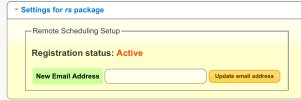
What do you mean by "remote login"? RS isn't a remote login, it is a cloud service which lets you set up commands for your HDR-FOX which the HDR-FOX itself polls to retrieve. You have to install the rs package, then use WebIF >> Settings >> Settings for rs package to register it.

If you want to set up remote access to the WebIF, you'll need to tunnel into your home network from outside.

PS: this forum allows attaching images in posts, which is much more friendly for the readership. Even for an externally-hosted image, you could have displayed it in the post.
 
Thank you - I found the rs package and installed it.
I get how this works. It is the correct setup for IoT - the device is not exposed on an open port and instead it periodically calls up a proper server, as a client. That server has proper security on its public side. The fashionable way for the IoT client side is MQTT but why bother?

Yes I can also access the Humax CF via a VPN to my home LAN and that works fine. This remote schedule setup is slicker and avoids VPN issues (a lot of wifi networks block VPNs, except ones using purely port 443).
 
You need to ensure your HDR Fox T2 powers on a couple of times a day for long enough to make contact with the RS server. If the box is in standby it won't wake to contact RS. You need to have enough schedule items eg reminders.

Also note you either need to enable Live Scheduling in the Advanced options or having set some recordings in RS end with a schedule reboot. Otherwise they won't be set in the schedule until the next time the box turns on and back off again, which may mean you miss what you were trying to record.
 
For "Live Scheduling" read "Real-Time Scheduling" (RTS). WebIF >> Settings >> Advance settings >> Real-time scheduling = ON

All this information is already thoroughly documented, of course. Potential users of RTS should be aware of the potential side-effects (runaway recordings), although none have been reported for a very long time. https://hummy.tv/forum/threads/real-time-scheduling-schedule-without-rebooting.7322/
 
Last edited:
"You need to ensure your HDR Fox T2 powers on a couple of times a day for long enough to make contact with the RS server. If the box is in standby it won't wake to contact RS. You need to have enough schedule items eg reminders."

That would be a problem since I rarely use the TV.

I will stick to my VPN solution :) It actually works even on a phone. Open the VPN and go to the Humax IP. Good website design!
 
That would be a problem since I rarely use the TV.
It shouldn't be a problem, because if you don't let the HDR-FOX power up occasionally (and change channels occasionally) the EPG gets stale and then series recording stop working (regardless of CF facilities).
 
So does going to http://[humax IP] bring the Humax out of standby? For me, this always works instantly. But then IIRC I have auto power down disabled in the original Humax settings, because it is a PITA to always having to wait for it to start up.

Does the CF handle the "record the whole series" differently to the box itself?
 
So does going to http://[humax IP] bring the Humax out of standby? For me, this always works instantly. But then IIRC I have auto power down disabled in the original Humax settings, because it is a PITA to always having to wait for it to start up.
No browsing to the HDR Fox T2's IP address does not bring it out of standby. As originally sold by Humax this box had no network features other than playing video through the portal (now does nothing), so wake on network traffic was pointless.

But since you keep your Humax out of standby all the time, RS will be regularly polling the server for new instructions so will work just as well as web UI access through VPN. And both of those need the Humax to change channel on a roughly daily basis or it will run out of EPG so no difference there.
Does the CF handle the "record the whole series" differently to the box itself?
Not that I'm aware of, it still ultimately has the Humax firmware do the recording. CF does not have access to the video hardware and TV tuners.
 
Does the CF handle the "record the whole series" differently to the box itself?
Please read up about it, I don't relish having to fill you in with every last detail that has been thoroughly explained before.

Even if you keep the HDR-FOX on all the time (as I do), it still needs the channel changed from time to time otherwise (as I said) the EPG goes stale, and that prevents subsequent programmes in a series getting scheduled to record. Try this for a search term: "series link".

The links in my signature box (below every post) are a good starting point.
 
I did read quite a lot but there is an absolutely huge amount out there to read, and it is all very simple to you guys because you have been doing this for years :)

I would just be really surprised if a stock Humax box failed to record a series if the customer did not occassionally change channels! It would make it useless. What if one was away on holiday?
 
I did read quite a lot but there is an absolutely huge amount out there to read, and it is all very simple to you guys because you have been doing this for years :)
I've been using an HDR Fox T2 with custom firmware for over a decade and there are things I still don't know. And I agree there is a huge amount on these forums and the wiki to read.
I would just be really surprised if a stock Humax box failed to record a series if the customer did not occassionally change channels! It would make it useless. What if one was away on holiday?
If you are on holiday and recording multiple series that are on more than one channel that's probably enough channel changes to avoid the issue. Might be a bit tight if you are only recording a couple of things a week.

I have the Disable OTA package installed with the option to set a schedule event. So all my boxes wake up and tune to channel 250 (I think that's the one) at 04:20 and switch off at 04:40. That's one channel change, and it gives a chance to contact the RS server. And even if my parents retune their HDR Fox T2 and wipe everything else in the schedule that event will get recreated by the package so I can still use RS to set recordings for them. I also use the Settings timer event to tune to BBC One HD daily at 16:20 to 16:40, that's another channel change and another chance for RS to get events. My aunt's box does this one at 08:20 because she watches TV all afternoon and evening. I set this up years ago for RS, but it has also removed any possibility of my boxes running out of EPG data. I have seen it reported here but never had the issue myself but would not expect to.
 
It would be common for people to record say several weekly episodes of a series, when they are away for a few weeks. If this failed, it would be crap, but more to the point it would get noticed. I am thinking about this as a software person. You can do a lot of crap stuff which for various reasons will never be discovered, but this one would be.

I did a google on this purposed Humax issue and yes it does confirm it, but it also says the box updates the EPG overnight, so you should not turn it off (well obviously!) but specifically not turn it off at night because that is when it does its EPG update. But that may not have been the FOX but some other Humax product.

It would be crap software if it did not regularly update the EPG. But then you cannot auto record what you don't know about :) Recording a series should work... I have some 60+ episodes of that abandoned engineering projects series and none seem to be missing. So maybe for a series there is some other mechanism.

Now, if one is talking about recording say every programme with "Apollo" in the name, that is a different thing. But few people will be doing that. Maybe the CF can do it.

What does Disable OTA do, given that there have not been any factory firmware updates for 10? years?

This is what google says:

Based on user experiences and troubleshooting for the Humax HDR-FOX T2 (Freeview) and related Foxsat HDR (Freesat) models, a series recording can fail if the device is left on a different channel for a very long time, though this is usually due to signal or EPG update issues rather than a direct punishment for not changing channels.
Here is the breakdown of why this happens and how to prevent it:

Why It Fails

  • EPG Update Failures: The Humax PVR requires regular updates from the broadcasters to keep the Electronic Programme Guide (EPG) accurate. If the box is left on a channel that doesn't carry updated metadata (or no channel at all for a long time), it may not pick up the updated time/channel information for the next episode in a series.
  • "Unable to Track Program" Error: If the series link data changes (e.g., the show moves to a different day or time) and the box hasn't updated its EPG, the series link fails.
  • Multiplex Limitations: The HDR-FOX T2 has two tuners. If you are recording two things, it cannot tune to a third to update its schedule.

The Solution

  • Leave on a Main Channel: When putting the box into standby, it is recommended to leave it tuned to a major channel (like BBC 1 or ITV).
and I do get that, if some TV channels do not carry the EPG and you left it on that channel for ages. The Humax should re-tune itself briefly to pick up the EPG but evidently it does not. So what is needed is a background task which selects a channel with EPG. Funny thing: in the morning I keep finding a channel like 250 tuned in, with nothing on it, and I've only just realised this!

 
Now, if one is talking about recording say every programme with "Apollo" in the name, that is a different thing. But few people will be doing that. Maybe the CF can do it.
I think you would need to use the Remote Scheduling server to do that. Good choice of search term by the way, I'm entirely in favour of recording everything to do with the Apollo lunar missions.
 
Back
Top