Subtitles not visible!

By default the Humaxes will not handle exFAT, not sure about FAT32 can't remember.
Of course they do FAT32. You wouldn't get very far with FAT16 (and even less far with FAT12).
And you're going to need a big USB stick, but those exist these days.
Anyone with any sense would use a USB-SATA cable with an SSD.
 
Also I seem to have missed the objective of having a Fox at each end.... ah wait - install the custom firmware and watch that way at the other end?
I have explained up-thread, but in case it got lost (and in more detail):

The HD-FOX is diskless, and records directly to an external (USB) drive. This is obviously a lot more convenient than having to spend time copying recordings onto an external drive post-recording, all you have to do is take the HDD with you. Portable HDD is best, but could also be SSD, or a large-capacity USB stick (but these have longevity issues). The recordings would be encrypted (regardless of StDef or HiDef), but play back with full facilities.

Connect the HDD to another HD-FOX, and the recordings will not play because of the encryption... but this is where CF comes in. With CF on one (or both) HD-FOXes, it is a simple matter to ensure both HD-FOXes are using the same encryption/decryption key. This is the benefit of the HD/HDR-FOX ecosystem over other commercial options – we know all about the encryption.

The only flaws I can see in this plan are (a) the slight risk the Australian HD-FOX might need reinitialising (although that might be possible even in Australia), and (b) some people's complaints about subtitle sync. My recommendation would be to source just one HD-FOX and sample the subtitles (or get others to try it – I'll see what I think of them when I get the opportunity).

NB: although the CF is in flash, replacing the conventional firmware, it also requires software support for the user interface and the software is on the HDD. This gets transferred between machines just the same as the recordings.
 
Some years ago I bought a hard drive from Maplins that had its own built in media player it could handle pretty much every format and even had a subtitle button on its remote, it was quite a sizeable lump with usb ,scart and other options to connect it to a TV/ PC etc ( Pre HDMI era) and a few others but I wonder if a similar option a fraction of the size available now could be a viable option. First result of a quick search was this that may be of use as a starting block...............................
 
Last edited:
Once again, I have a solution which works - I was just looking for a more convenient way to do it. Re Phil's last comment, I'll have to try USBs on more TVs. (Phil - were subtitles ON during recording??)
Let me be clear. My test recording from the 5000T was an old timed recording. There is no option to switch recording of subtitles on or off. You record the video, audio and subtitles (if the channel transmits them) for all TV.

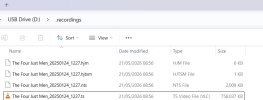
If I record from the Humax to my networked PC I get .mpeg files - see the screenshot. I will record something direct to USB stick again to check which sort of files that results in, but the one time I did it I thought they were also .mpegs.
You cannot record direct to a USB stick on the 5000T. All recordings are made to the 5000T's internal hard drive. You can save a recording to USB later. I'm not sure how you put the recordings onto the USB stick. Is the stick in your computer or in the 5000T?
 
If I record from the Humax to my networked PC I get .mpeg files - see the screenshot
Those are not necessarily .mpeg files. To find out what the filename extension they are, you need to go into Windows settings and turn off the (very stupid*, but default) switch to hide file extensions. The "Item Type" being displayed is Windows reporting what the file association is, as configured in the registry. The other thing you can do is right-click and view file properties.

* [I do not recommend having file extensions hidden – not only do you get misled but there are opportunities for malicious files to show something like .pdf but actually be .pdf.exe (for example).]

When you say "record from the Humax to my networked PC", I presume you mean "export" rather than "record". The export process does not necessarily copy the recording as-is, and may well not include the subtitle steam. In particular, HiDef material typically gets downgraded during export. If you don't mean export, please explain in detail because I don't think any of us know what you mean.

Struggling here with Quotes and Multi Quotes
Newbies' Guide to the Forum (click)
 
The export process does not necessarily copy the recording as-is, and may well not include the subtitle steam.
If by export you mean initiating a copy to USB from the Humax device - then the 5000T will decrypt and copy the StdDef .ts file "as is" to the USB along with modified sidecar files which for the 5000T include a replacement for .hmt which no-one has deciphered! The copied .ts contains all the streams recorded.
I'm not sure that AyrtomH has moved files to USB this way - and I am currently trying to see what happens if you do the copy (export) a different way.
 
and I am currently trying to see what happens if you do the copy (export) a different way.
Not easy as Windows 11 doesn't want to play ball. I give up!
Those are not necessarily .mpeg files. To find out what the filename extension they are, you need to go into Windows settings and turn off the (very stupid*, but default) switch to hide file extensions. The "Item Type" being displayed is Windows reporting what the file association is, as configured in the registry. The other thing you can do is right-click and view file properties.
You beat me to it with that information. I was going to say the same!
 
Could somebody please describe exactly what the problem is with subtitles on a HDR-FOX, and how to reproduce it in as short a time as possible, because I'm playing a recording of Race Around The World on my HD-FOX with subtitles on and they seem fine to me. Is the problem restricted to time-shifted live broadcast by any chance?

Subtitling on live TV is laggy, but I attribute that to the broadcast being live and the subtitles being generated on the fly. (If AI is doing it, I was impressed it spelled "sett" correctly.)
 
Last edited:
It seems to me the OP has FTP access or something like that.
I'm not sure. I think I've read somewhere that W11 has problems with Humaxes. (There's a load of cr@p stored in my memory, not the computer's but my brain, and I end up half-remembering things I read ages ago). I can't get the 5000T to connect to W11 as a network drive, only as a media server. Even then it's not recognising it properly and I can't get a connection that looks like the OP's image. I could try in XP but I don't think that'll work at all.
 
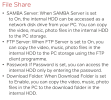
A quick skim of the FVP-5000T manual produces this:

1779784175938.png

Note the FTP option. The file manager I use (DOpus) integrates FTP into the "normal" browsing ability. However, it is likely non-sophisticated users will simply go with the flow and be using SMB.

We know the HDR-FOX also has FTP, and we have added SMB/NFS, but these only access the content as-is (ie encrypted). Is the 5000T really exposing unprotected files, or is it restricted to StDef? Is there on-the-fly decryption?
 
Last edited:
I know nothing about Samba as I can never get it to work. It wouldn't work in XP and I can't seem to make it work in W11 either.
FTP is only good for transferring TO the 5000T because it won't decrypt files going the other way.
I read somewhere on this forum, and I can't find it, where the 5000T disk is recognised in some version of Windows (probably 7 maybe 10) and files can be dragged from the 5000T and dropped on the PC and be decrypted. The mpeg and ts mixup was probably mentioned there as well. I have no idea whether the file gets mangled in the process. I wouldn't have thought so because I think it uses the media server to decrypt the file and provides a standard http style link to a .ts file. Now, where I've done similar using either Media Monkey or a bodged version of something I wrote for the 2000T, the .ts file is just the decrypted version of the file on the 5000T's HDD - complete with all streams and the added cr@p.
 
Yes, but I have also read (somewhere) that some units (not necessarily the 5000T) transcode to reduce resolution on export. Perhaps that's the Aura (more processing power). Without corroboration from another owner (you) I was making no assumptions.

FTP is only good for transferring TO the 5000T because it won't decrypt files going the other way.
We don't know for sure (or at least I can't remember) whether the files the OP has illustrated are decrypted or not.
 
Re a few of the many valid points above:

Thanks for the re-direction to the Newbies guide.
The media players look very interesting, but, would they play subtitles?
I'm able to save recordings direct from the Humax to my Win 11 laptop using the wifi network (but NOT to the remote Win 10 desktop via wired ethernet 'through-the-earth-wires' range extenders?)
Re encryption, my understanding (as people have said above) is that SD files are NOT encrypted; HD ARE and cannot be use-ably transferred.
When I said "record direct to USB stick" I should of course have said "copy to etc" and "record from the Humax to my networked PC" should equally have been "export from" etc - apologies for misunderstandings.
I'm using drag-and-drop in Win11 to transfer files from Humax to PC - nothing clever (FTP?)
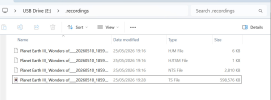
I've just done another direct-to-USB-stick recording from the Humax and it IS a .ts file - see the screenshot below. It plays on the PC (legacy Media Player seems best), but of course, no subtitles. There seem to be 4 files transferred...

1779786486707.png
 
Last edited:
We don't know for sure (or at least I can't remember) whether the files the OP has illustrated are decrypted or not.
I had the impression that files had played, indicating decryption, but that subtitles couldn't be accessed.
Yes, but I have also read (somewhere) that some units (not necessarily the 5000T) transcode to reduce resolution on export.
I think there is a setting on the Aura that can do that - reducing resolution from the media server. You can also manually reduce resolution for HiDef files and they will transfer decrypted. If you're stupid you can use the transcoding on StdDef - messes with the resolution and converts to mpeg-4 (from mpeg-2).
 
I've just done another direct-to-USB-stick recording from the Humax and it IS a .ts file - see the screenshot below. It plays on the PC (legacy Media Player seems best), but of course, no subtitles. There seem to be 4 files transferred...
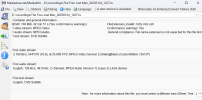
That looks correct. Media Info or ffprobe would probably tell you that the .ts file has subtitles in it.
With my test item:
Screenshot 2026-05-26 101451.png


Screenshot 2026-05-26 101530.png
The Windows 11 media player can't find the subtitles. But in VLC (free).
Screenshot 2026-05-26 101703.png

The file contains the subtitle information!
 
Could somebody please describe exactly what the problem is with subtitles on a HDR-FOX, and how to reproduce it in as short a time as possible, because I'm playing a recording of Race Around The World on my HD-FOX with subtitles on and they seem fine to me. Is the problem restricted to time-shifted live broadcast by any chance?
Someone posted on this thread that they drift out of sync over time, so the test may not be quick. Start something playing, turn on subtitles, and come back 50 minutes later to check subtitle sync?
Subtitling on live TV is laggy, but I attribute that to the broadcast being live and the subtitles being generated on the fly. (If AI is doing it, I was impressed it spelled "sett" correctly.)
Historically it's been highly skilled people live subtitling. I believe they work in shifts, something like 20 minutes subtitling then they go and lie down in a darkened room for 40 minutes before they're back on.
 
Re a few of the many valid points above:

Thanks for the re-direction to the Newbies guide.
The media players look very interesting, but, would they play subtitles?
As I said my old hard drive came with a remote that had a dedicated subtitles button so it could certainly deal with subtitles in some form or other and I expect todays versions will too, whether they will work in the form given by your 5000t requires your need to investigate, Using all the advice given by others you should be able to establish exactly what formats you are dealing with and I expect many of the media players have sites where you can ask questions to see if they are compatible. Good luck hopefully all goes well as it certainly would be a nice simple easily portable option that would also be useful as a storage device when not down under.
 
Back
Top