• The forum software that supports hummy.tv has been upgraded to XenForo 2.3!

    Please bear with us as we continue to tweak things, and feel free to post any questions, issues or suggestions in the upgrade thread.

Cloning/Fixing Failed HDD

I think the MBR on the Humax is fairly simple.
I don't think the HDR populates the MBR with boot code, so it may be 440(?) bytes of 0x00, followed by the disk ID, partitions etc.

In this instance and in Linux, you can view/check the MBR which is the first 512 bytes (aka LBA0) of a drive by
hexdump -Cn 512 /dev/sdX


Be very careful if you amend it as you can can easily corrupt your partition table.

Code:
humax# hexdump -Cn 512 /dev/sda
00000000 00 00 00 00 00 00 00 00 00 00 00 00 00 00 00 00 |................|
*
000001c0 09 00 83 fe 3b 82 08 00 00 00 b7 1c 20 00 00 fe |....;....... ...|
000001d0 3d 82 83 fe ff ff c0 1c 20 00 df 0a d8 38 00 fe |=....... ....8..|
000001e0 ff ff 83 fe ff ff a0 27 f8 38 9f 24 40 01 00 00 |.......'.8.$@...|
000001f0 00 00 00 00 00 00 00 00 00 00 00 00 00 00 55 aa |..............U.|
00000200
humax# hexdump -Cn 512 /dev/sdb
hexdump: /dev/sdb: No such device or address
humax# fdisk -l /dev/sda

Disk /dev/sda: 500.1 GB, 500107862016 bytes
255 heads, 63 sectors/track, 60801 cylinders
Units = cylinders of 16065 * 512 = 8225280 bytes

   Device Boot  Start End     Blocks     Id System
/dev/sda1       1     131     1052251+   83 Linux
Partition 1 does not end on cylinder boundary
/dev/sda2       131   59495   476841327+ 83 Linux
/dev/sda3       59495 60801   10490447+  83 Linux
humax# ls /media/My\ Video/
humax#
 
Last edited:
I don't think the HDR populates the MBR with boot code,
There is no boot code. The loader is in flash memory, as is the kernel and root filesystem. How would the machine boot with a blank disk otherwise?
so it may be 440(?) bytes of 0x00, followed by the disk ID, partitions etc.
446 bytes of 0, 64 bytes of partition table and 2 bytes of marker. A "disk ID" is something you seem to have invented.

It's amazing how he seems to implicitly trust all the other tools he's been using, and random opinions about stuff from random places on the internet (be careful quoting those links, just in case...), but won't trust anything said here or developed here, even though here would be an authoritative source if he were looking from the internet without previously knowing about here.
The fixdisk script is just plain text, which anyone can read, and just invokes standard tools (which he presumably won't trust either). It's border-line irrationality. And what has he got to lose by this lack of trust anyway? Not a lot that I can see.
 
In this instance and in Linux, you can view/check the MBR which is the first 512 bytes (aka LBA0) of a drive by
hexdump -Cn 512 /dev/sdX
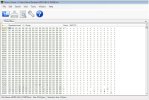
The contents of LBA 0 from one of my two working HDDs (as read by DMDE and displayed by Binary Viewer) begin with a run of 0x00 (440 of them) and end with 0x55AA (2-byte signature/marker) which is consistent with what my research has turned up. I’m very pleased with what I’ve achieved so far – cloning the failing drive and repairing 7 of the sectors that didn’t copy across – and all the signs are that with just that LBA 0 to fix I’m in a good place. A second brand new 1TB HDD has just arrived so I think I’ll bank the progress-to-date by cloning the clone, then I can experiment with (1) trying the LBA 0 from a working HDD, (2) Windows tools for rebuilding LBA 0 and (3) fixdisk, once I’ve installed CF on one of my spare units. My background is electronics, not IT, so if a simple sector-copy solves the problem, or there’s a Windows tool that’ll do the job so much the better (and I’ve no reason to doubt the ones I’ve used so far).
 

Attachments

  • LBA 0 contents.jpg
    LBA 0 contents.jpg
    145.9 KB · Views: 4
if a simple sector-copy solves the problem, or there’s a Windows tool that’ll do the job so much the better
You admit you have no IT background and yet you won't acknowledge advice that Linux tools will handle a Linux file system better than Windows tools? This is stupid. fixdisk is a CF script for automating the use of Linux tools. Just do it.
 
You admit you have no IT background and yet you won't acknowledge advice that Linux tools will handle a Linux file system better than Windows tools? This is stupid. fixdisk is a CF script for automating the use of Linux tools. Just do it.
Agreed. fixdisk has had a lot of work put into it and is now quite a sophisticated tool. Anything goes wrong with the hard discs on the four HDR Fox T2s I look after in three households I just run fixdisk and it sorts it out.
 
A point of agreement is that the first step was to create a clone of the failing HDD, yes? I did that. Maybe I'm missing something, but surely then slavishly using fixdisk wouldn't have repaired the sectors that didn't, for whatever reason, copy across?
 
A point of agreement is that the first step was to create a clone of the failing HDD, yes? I did that. Maybe I'm missing something, but surely then slavishly using fixdisk wouldn't have repaired the sectors that didn't, for whatever reason, copy across?
Having created a clone of the failing disc for safety, I would then have run fixdisk on the original disc not the copy. Unix filesystems have backup copies of key filing system structures (as do Windows filesystems) and fixdisk can copy those backup copies back to the main locations once the sectors have been remapped even if the contents were not recovered on the remap. A pure sector by sector clone can't do that.

By not running fixdisk you are relying on recovery of the original sectors alone and not taking advantage of the redundancy built in to the filesystems.
 
I’ve not posted to this thread - which I started - for a while as I considered my time was better spent working the issue rather than (unintentionally) raising the blood pressure of learned commenters and inviting ad hominems; more heat than light was being generated, despite my obvious need for the latter. In truth (and there’s a lesson here for others who might find themselves in a similar position) it is unrealistic to expect the level of support needed to grip a problem like this via this channel.

From the start, MS Copilot has proved to be the perfect partner: From recommending suitable USB-Sata adapters, replacement HDDs and helpful Windows tools through to demystifying partition tables and editing them and the final step of the fix it has been simply brilliant. It’s been quite a journey, I’ve learnt a lot – and I couldn’t have done it without that level of support. We both made mistakes along the way but were checking each other, being creative and steady progress was made throughout the journey. I kept all our chats, took copious screen grabs and notes and will review the paper trail over the coming days to produce a step-by-step summary.

This thread may not be the best place to post this particular case study but I’m happy to share the summary in the hope it will help others - and save them a great deal of work.

As for fixdisk, as I expected it proved not to be the panacea some think it is; I ran it twice (on the original failing HDD and the clone) and both times it exited with an error code; much deeper-level work was needed using the Maintenance Mode cli option. Principal Windows tools used (suggested by MS Copilot) were HDD Raw Copy Tool, DMDE and HxD. DMDE’s partition-scanning feature was particularly helpful. I didn't, in the end, use a Linux-booted laptop - just a very old Windows 7 one and one of my spare HDR-Fox T2s which I was happy to install CF on.
 
This thread is short, I see no reason to start a new thread to post what you did.

EDIT: And that's the first time I've seen anyone who's opinion I have reason to respect say MS Copilot has been useful to them.
 
Last edited:
I was of the belief that fix-disk should repair LBA 0 errors (at least on disks formatted to MBR by the Humax itself).
Here a test run in maintenance mode (don't try this on anything important).
Code:
hdr# umount /mnt/hd3
hdr# umount /mnt/hd2
hdr# umount /mnt/hd1
hdr# mount
rootfs on / type rootfs (rw)
/dev/root on / type squashfs (ro)
proc on /proc type proc (rw)
sysfs on /sys type sysfs (rw)
usbfs on /proc/bus/usb type usbfs (rw)
devpts on /dev/pts type devpts (rw)
tmpfs on /tmp type tmpfs (rw)
tmpfs on /media type tmpfs (rw)
/dev/mtdblock1 on /var/lib/humaxtv type jffs2 (rw)
/dev/mtdblock2 on /var/lib/humaxtv_backup type jffs2 (rw)
/dev/mtdblock2 on /usr/browser/opera_dir/certs type jffs2 (rw)
/dev/mtdblock2 on /usr/browser/client.conf type jffs2 (rw)
/dev/mtdblock2 on /etc/ssl/certs/ca-certificates.crt type jffs2 (rw)
/dev/mtdblock2 on /etc/opkg type jffs2 (rw)

hdr# dd if=/dev/sda of=/var/lib/humaxtv/mod/mbr.bin bs=512 count=1

hdr# hdparm --make-bad-sector 0 --yes-i-know-what-i-am-doing /dev/sda

/dev/sda:
Corrupting sector 0 (WRITE_UNC_EXT as pseudo): succeeded

hdr# hdparm -z /dev/sda

/dev/sda:
 re-reading partition table

hdr# fix-disk -F
Running /bin/fix-disk

Checking disk sda (512 byte sectors)

Partition /dev/sda1 is already unmounted
Partition /dev/sda2 is already unmounted
Partition /dev/sda3 is already unmounted


Running short disk self test
Error at LBA 0    
Do you wish to attempt repair of the bad block? [Y/N]: y

/dev/sda:
re-writing sector 0: succeeded

Running short disk self test
                  
No pending sectors found - skipping sector repair

Checking partition tables...

MBR Status: not present
GPT Status: not present

Partition table is missing/corrupt. If the disk has not been formatted by 
the Humax, recovery by fix-disk may not be successful.

Searching for partitions...

Partition 1 starts @ 2, ends @ 2104514
Partition 2 starts @ 2104515, ends @ 955787174
Partition 3 starts @ 955787175, ends @ 976768064
Do you wish to attempt repair of the partition table? [Y/N]: y

/dev/sda:
 re-reading partition table
New partition table has been created
Disk /dev/sda: 465.8 GiB, 500107862016 bytes, 976773168 sectors
Units: sectors of 1 * 512 = 512 bytes
Sector size (logical/physical): 512 bytes / 512 bytes
I/O size (minimum/optimal): 512 bytes / 512 bytes
Disklabel type: dos
Disk identifier: 0x3cd6d4ba

Device     Boot     Start       End   Sectors   Size Id Type
/dev/sda1               2   2104513   2104512     1G 83 Linux
/dev/sda2         2104515 955787173 953682659 454.8G 83 Linux
/dev/sda3       955787175 976768063  20980889    10G 83 Linux
Using superblock 0 on sda1
Using superblock 0 on sda2
Using superblock 0 on sda3
Dev: /dev/sda LBA: 0

File system checks skipped
It has found the partitions and initially shows the correct lengths but the sizes written to the partition table are one sector short.
This used to work but seems to have been broken at some point.

Edit: added the save to mbr.bin line, to allow restore should fix-disk fail to create a valid partition table.
 
Last edited:
I was of the belief that fix-disk should repair LBA 0 errors (at least on disks formatted to MBR by the Humax itself).

When I ran fixdisk on the failing HDD it detected an error at LBA 0 and succeeded in re-writing LBA 0 (to a new, healthy physical sector). However, it wrote a template LBA 0 not the original contents of LBA 0 (which were irrecoverable). Fine as far as it went, but its partition table didn't accord with the sda1 (1.08GB) partition created when I formatted a spare hard drive in the test-bed Humax (running up-to-date Humax firmware). Because I ultimately used that new sda1 (copying across all its sectors to the clone using DMDE) I had then to edit the partition table to match (using HxD).

DMDE and HxD are free Windows apps which were easy to use and worked well.

(From examining my three original Humax HDDs I found that sometimes there is a one-sector gap between partitions, at other times there isn't; normal and nothing to worry about says you-know-who.)
 
Last edited:
Back
Top