Humax greenscreen on some tvs

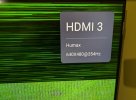
I have just experienced this issue with a new TCL C6K TV. (Humax boot screen appears ok, followed by 2 seconds of video, then the flat green.)

I obtained one of the PROZOR boxes off EBAY and it has NOT solved the problem, green screen remains. I'm guessing this box has a later firmware which is passing through the HDCP handshake.

So, it's time to try an even cheaper splitter box and, till it arrives, the disable pin 19 mod is in force, though this needs multiple presses of the V-Format button to get 1080 video on every startup of the Humax.
 
So, it's time to try an even cheaper splitter box and, till it arrives, the disable pin 19 mod is in force, though this needs multiple presses of the V-Format button to get 1080 video on every startup of the Humax.
Have you tried the boot-settings package setting 1080p?
 
My guess is it won't help, but you might be lucky.
As you suspected Owen, despite setting 1080p as the boot setting the TV always sees this until I cycle through! A VGA res with a crazy frequency. Guess it's just an oddity of this TV
 

Attachments

  • Capture.JPG
    Capture.JPG
    299.6 KB · Views: 10
What you're seeing there is NOT the classic "green screen", so I doubt the solutions for the classic green screen will do anything to help you.

The classic green screen is solid, and caused when the HDMI link fails HDCP negotiation. What you have is some kind of failure of the video capability negotiation, or simply the inability for the TV to lock onto the HDMI signal.

It is the cycling of the video parameters causing it to acquire lock, not any particular setting in the HDR-FOX.
 
Hi BH, as explained in post 41 that's the screen I, on power on, with HDMI pin 19 disabled. Thern pressing V-Format about 6 times gets me to the 1080p normal picture and a usable HUMAX!

The green screen appears, like in others experience, with pin 19 complete.
 
It seems that failing the negotiation (as a result of no pin 19) clears the video resolution (or disables the video output?). Then 6 x V.Format restores a working 1080p output, as if the negotiation had worked.

In my configuration with STB->AVR->TV, leaving the Humax on (for as long as it doesn't crash) seems to maintain the V.Format setting even if the other two devices are put into and out of standby.
 
That pin should not prevent negotiation, failed negotiation produces a green screen. Pin 19 is about hot plug detection.
 
I decided to see what's what with this HDMI Pin 19 thing, so I prepared a cable with Pin 19 disconnected.

Using a HD-FOX and a Samsung UE32H5000 TV, with Pin 19 removed I can't get a picture (or sound, come to that). If I reboot the HD-FOX, I get the Humax splash screen (proving there's nothing wrong with the video link per se), but then nothing else and the TV reports "no signal".

The V-FORMAT thing doesn't seem to work for me.

Comments?
 
After some research, it seems this "hot plug detect" pin is instrumental to enabling video output. If a connection is not detected, video is simply turned off (but in software rather than hardware - because I still get the boot-up splash screen).

I am perplexed why this could ever have been a solution. Without pin 19 intact (or perhaps pulled to a logic level?), the 'Fox doesn't recognise there is a display connected and doesn't output (but, if the display doesn't complete the HDCP negotiation, the 'Fox outputs a green screen).

I have tried setting the V-FORMAT to 576i and then swapping the cable, no joy. Repeated everything on a cheapo "Luxor" TV, same results (Humax splash screen, then no video).

Granted I'm doing this on HD-FOX, but I can't see that HDR-FOX is going to be any different.
 
It could be the chipset doing this blanking rather than Humax firmware.
I don't think so, otherwise there would be no splash screen either.

Without evidence to the contrary, I'm happy to assume the HD and HDR hardware is the same in this area. Why would they go to the trouble of designing a different one, and dilute the economy of scale to boot?!

Been doing some reading, and it seems HDMI does encrypt the payload for HDCP (contrary to my expectations), in order to prevent eavesdropping. Considering 1080p25 is about 500Mbps on each of 3 channels, that seems remarkable.

When HDCP fails to a green screen, it seems likely that the receiver is failing to decrypt the stream and presenting a green screen, rather than the sender sending a green screen as I previously supposed. The actual video timings may be still present on the HDMI channels, just the pixel data is corrupt.

I cannot find any authoritative reference to Hot Plug Detect being involved in HDCP.

It seems to me the only ways forward (for those suffering from a green screen) are:
  1. An (unauthorised) HDCP stripper, which is a unit that uses illicitly-obtained credentials to decrypt protected output and send on HDMI unprotected. Reading indicates the necessary credentials are now known in the wild, but Intel threatens to sue anyone building them into a device without license. I can't imagine that carries much weight in the Far East!
  2. See whether setting V-FORMAT to non-HiDef (eg 576i) results in the 'Fox outputting HDMI without HDCP.
  3. An analogue connection, preferably RGB rather than SCART (or at least SCART in RGB mode), which will be 576i but is reasonably watchable in my experience.
  4. If your TV only had HDMI inputs, then RGB to an HDMI converter.
I know there are posts above contrary to this, please provide more details.

UPDATE: NEW RESULTS BELOW
 
Last edited:
When HDCP fails to a green screen, it seems likely that the receiver is failing to decrypt the stream and presenting a green screen, rather than the sender sending a green screen as I previously supposed. ...

Yes.

My set-up that previously needed a lot of faff (HDR-"customised" HDMI>AV receiver-HDMI>TV) seems to be much more stable now. I leave the HDR on and we get picture+sound as configured after turning on the the rest of the chain; or if the HDR reached its "sound with frozen picture" hang, we get the correct picture+sound after power cycling and 6xV.Fmt (IIRC)

When I rebuild it after re-dec, I'll find out if the HDR has gone back in spec, or whatever.
 
An (unauthorised) HDCP stripper, which is a unit that uses illicitly-obtained credentials to decrypt protected output and send on HDMI unprotected. Reading indicates the necessary credentials are now known in the wild, but Intel threatens to sue anyone building them into a device without license. I can't imagine that carries much weight in the Far East!
Plenty of these are available from Chinese manufacturers. There are even legitimate uses for them, like working around broken or incompatible hardware or splitting the signal to go to a projector and a TV.

I use a 4K HDMI downscaler and splitter from China to run my Apple TV 4K into my 1080p 32" TV. Reason being the Apple TV 4K only gets higher quality audio as part of 4K video streams, if I stream 1080p the picture is poor (clearly worse than 4K downscaled) and the audio quality is awful. And Apple TV will only supply Atmos sound with 4K video streams, not that I have height speakers but the Atmos sound is another step up in audio quality when my home cinema amp gets Atmos and renders it direct to my 4.1 speaker layout (no centre speaker). It annoys me that people have to jump through these hoops and rely on technically illegal devices to get what they paid for.
 
Yes.

My set-up that previously needed a lot of faff (HDR-"customised" HDMI>AV receiver-HDMI>TV) seems to be much more stable now. I leave the HDR on and we get picture+sound as configured after turning on the the rest of the chain; or if the HDR reached its "sound with frozen picture" hang, we get the correct picture+sound after power cycling and 6xV.Fmt (IIRC)

When I rebuild it after re-dec, I'll find out if the HDR has gone back in spec, or whatever.
Is that a HDMI link minus Pin 19?
 
Oh wow, I had another go and made HDMI sans-19 work.

Concerned there may be a difference between HD-FOX and HDR-FOX, I switched my attention to another set-up. found the V-FORMAT trick worked on there and then came back to the HD-FOX – and it works here too. I guess my original failure was not knowing what to expect, how long to wait.

After extensive experiments, this is what works:

2 or more presses of the V-FORMAT button in quick succession, it doesn't matter what the video format is so long as an input is registered.

The first press brings up the video format report, subsequent presses while the report is on-screen cycle through the 5 options*. Therefore, 6 presses in quick succession returns to the previous format. Then wait, because it takes about 4 seconds for video to return (at least, it does on my TV). This has to be done "blind", because until the video is restored you have no video and no on-screen graphics to guide you.

* The options are 576i, 576p, 720p, 1080i, 1080p – but the starting point in that cycle depends on how you left it.

It doesn't matter whether "loss" of output is induced by reconnecting the HDMI lead, power-cycling the TV, or rebooting the 'FOX, the V-FORMAT trick restores output.

Initially I guessed that it was setting a lo-res format which would kick it into life, but actually no – any format change kicks it into life (including a "change" to the same video format). For some reason this is tricking the HD/HDR-FOX into ignoring the hot-plug-detect signal, and might not work on other equipment (Humax or otherwise).

Does this trick defeat or renegotiate HDCP ("green screen")? I have no means to test it myself, but I have received direct confirmation that it has in one specific case where a new TV would not co-operate with an existing HDR-FOX.

I have experimented with macros using the ir package (WebIF >> Remote). Bearing in mind my default is 1080i (and have that set in boot-settings), I have found defining the following macro restores video from boot:

Code:
DELAY5 V-FORMAT DELAY1 V-FORMAT DELAY1 V-FORMAT DELAY1 V-FORMAT DELAY1 V-FORMAT DELAY1 V-FORMAT

Naming the macro "boot" causes it to auto-run at start-up.

Note that the DELAY commands are pseudo-buttons on the virtual remote itself. There may be optimisations, but without the DELAY1 I found not all V-FORMAT got registered, and without the initial DELAY5 the sequence started before the system was ready.

For this to work, the TV must be turned on before you boot the 'FOX (or at least be ready to accept input by the time the macro finishes). To fix the video if the 'FOX is already booted (and you don't want to restart it), you could re-run the boot macro from WebIF >> Remote, or assign a similar macro to a handset button* you don't use (or just press the V-FORMAT button 6 times).

* This involves editing the map file, which is bookmarked at WebIF >> Diagnostics >> File Editor. See the wiki for details.

With the "boot" macro installed, starting up the 'FOX first displays the Humax splash screen, then the screen goes black (and the TV may report loss of signal). Then, after 15-20 seconds, the picture should establish.

If there are any errors in manual input (or, indeed, even the macro input, if any of the keypresses happen not to be registered), it may be necessary to restore your preferred video resolution, using V-FORMAT again.

 
Last edited:
How To Prepare a "Sans-19" HDMI Lead

While exploring, I almost destroyed a "good" HDMI lead which had metal screening in the plugs, and it was much easier modifying a not-so-good lead without the metal screening. It's not obvious which is which at the outset, but if you start with a really cheap HDMI lead it probably won't be screened. If it's anything to go by, the screened plugs are quite chunky and square, whereas if there is clearly not much rubber around the raw connector it probably isn't screened.

On the other hand, if you have a weak TV signal, you probably do want screened plugs in your HDMI lead...

I tried breaking into the cable itself, but that meant disturbing the cable braiding and then the foil screening beneath, and then trying to identify which conductor is hot-plug-detect. That's how the first lead nearly bit the dust – I decided pursuing that approach was too risky.

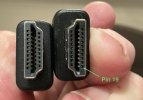
The photo shows which is Pin 19 (see arrow).

IMG_5028.jpeg

I'll describe modifying a plug with a screening shell, because without the shell all you have to do is ignore the steps involving it. For making good, it would be ideal to have some self-amalgamating tape* (see below) to hand.

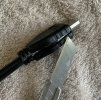
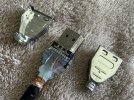
What worked for me was to remove the rubber housing by slicing it all along one side (including the cable strain relief) with a sharp craft knife. Mind your fingers!

IMG_5033.jpeg IMG_5034.jpeg

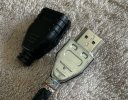
Now the two halves of the shell separate, having eased the crimp open around the cable (tease it with a fine screwdriver, open it out straight with pliers more than shown – for reassembly). There are latches near the connector end which need teasing too.

IMG_5035.jpeg

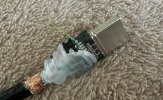
The moulded insulation near Pin 19 can be eased up, exposing the solder joint (see arrow). Note this is on the "fat" side (with 10 contacts) not the "narrow" side (with 9 contacts).

IMG_5036.jpeg

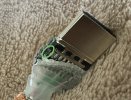
Rather than try to get a soldering iron in there, I simply used an approach we used to rework PCBs: make two parallel cuts across a track and remove the copper in between. That meant the track was definitely cut. With the point of a sharp knife, press hard to cut through the contact at the connector end and at the wire end, and remove between the cuts (see the ellipse).

IMG_5037.jpeg

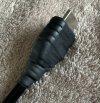
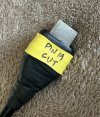
Press the insulation back, then replace the shell and re-crimp it around the cable. Be careful which half goes where, they only fit one way around as per the D shape of the connector. Then the rubber housing can be replaced. To seal it up, I simply wrapped if with self-amalgamating tape. And then finally added a label with some yellow heat-shrink and a fine-point permanent marker (Sharpie).

IMG_5038.jpeg IMG_5039.jpeg

To be absolutely clear (seems obvious, but...): you only need to do this at one end of the cable, and it doesn't matter which way around you use the cable.


* Self-Amalgamating Tape

Vital supplies in the tool kit of any DIY-er, self-amalgamating tape is a strip of natural unvulcanised rubber which can be wrapped around things and sticks to itself, and eventually merges into one solid layer. Stretch it as it goes on to produce a tight clamp and improve amalgamation (and a thinner layer). So that it doesn't amalgamate on the roll, it has a backing strip separating it (which you remove – either as it comes off the roll, or cut a length and remove it before application). It can be easier to handle if a length is cut first.

It will seal low-pressure plumbing (waste pipes), but don't expect it to seal a leak in a mains feed. Great for making rubber handles on tools.

Self-amalgamating tape used to be quite expensive, but now quite often found in Aldi called "stretch repair tape" and also available at Screwfix etc etc (for a bit more money). Buy some when you see it. If it doesn't have a separator strip, or isn't stretchy, or feels sticky on one side rather than grippy on both, it isn't self-amalgamating tape.
 
Last edited:
  • Like
Reactions: Vic
Back
Top