What do you think of my mod?

Andy-in-Ireland

New Member
out with the 3.5" 320GB and in with a 2.5" 1TB laptop SATA hard drive - was goig to fit 1TB SATA SSD drive but they are a bit pricey at the moment and i had a 1TB mechanical lying around. I know its not professional looking with the cable tie holding it in place but it works. - I place it on top of the CI slot
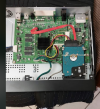
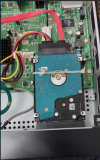
1791388754103.png 1791388805009.png
 
Why can't you put it where the original 3.5" disc goes? There are loads of cheap mounting kits for fitting a 2.5" drive into a 3.5" bay, it's just a piece of metal with some threaded holes and some screws.

Not suggesting what you've done won't work, but you've lost the vibration isolation of the original Humax drive bay. At least I assume the Foxsat has that, the HDR Fox T2 has some big rubbery washers and they are quite good at reducing noise from the drive.
 
To add to what Owen said, which I completely agree with, laptop/desktop drives aren't really suitable for use in PVRs. You'll get away with it for a while, but it's not what they were designed for.
To answer the thread title: Not a lot.
 
Why can't you put it where the original 3.5" disc goes? There are loads of cheap mounting kits for fitting a 2.5" drive into a 3.5" bay, it's just a piece of metal with some threaded holes and some screws.

Not suggesting what you've done won't work, but you've lost the vibration isolation of the original Humax drive bay. At least I assume the Foxsat has that, the HDR Fox T2 has some big rubbery washers and they are quite good at reducing noise from the drive.
Hi, thanks for your input

I am not sure you would need the rubber dampers - very little if any sound/vibration from a laptop hard drive. with mechanical laptop hard drive more like very quiet clicking/jitter as its reading or writing hardly noticeable , and when I do eventually change it to a 2.5" SSD then there will be no motor noise or any other noise it will be totally silent.

I know the 3.5 to 2.5 brackets exist , cant see the point of getting one , just one extra thing to buy when there iks enough room above the CI slot.


2.5" laptop drive runs a hell of a lot cooler than the 3.5" 320GB that was in it so does not need the fan where the 3.5" disk enclosure was .... however I have put the enclosure back and plugged the fan connector back on just in case its needed to extract the hot air from the PSU in the box and any other residul heat.
 
The drive caddy in the HDR-FOX includes a fan, and it (to some extent) ducts air to the SoC. I presume the Foxsat is (should be) similar in that respect. Preventing the electronics overheating is critical to longevity.
 
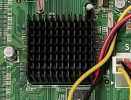
is the SOC the one on the main board with the heatsink? - I.E. this:

1791458541853.png

if so then the ducting from the 3.5" caddy only goes to the power supply board. - I have put the caddy back in anyway yesterday and also plugged the fan in anyway ..... just without the 3.5" hard disk in it!
 
Back
Top