What do you think of my mod?

Andy-in-Ireland

New Member
out with the 3.5" 320GB and in with a 2.5" 1TB laptop SATA hard drive - was goig to fit 1TB SATA SSD drive but they are a bit pricey at the moment and i had a 1TB mechanical lying around. I know its not professional looking with the cable tie holding it in place but it works. - I place it on top of the CI slot
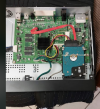
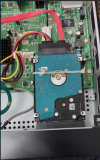
1791388754103.png 1791388805009.png
 
Why can't you put it where the original 3.5" disc goes? There are loads of cheap mounting kits for fitting a 2.5" drive into a 3.5" bay, it's just a piece of metal with some threaded holes and some screws.

Not suggesting what you've done won't work, but you've lost the vibration isolation of the original Humax drive bay. At least I assume the Foxsat has that, the HDR Fox T2 has some big rubbery washers and they are quite good at reducing noise from the drive.
 
To add to what Owen said, which I completely agree with, laptop/desktop drives aren't really suitable for use in PVRs. You'll get away with it for a while, but it's not what they were designed for.
To answer the thread title: Not a lot.
 
Why can't you put it where the original 3.5" disc goes? There are loads of cheap mounting kits for fitting a 2.5" drive into a 3.5" bay, it's just a piece of metal with some threaded holes and some screws.

Not suggesting what you've done won't work, but you've lost the vibration isolation of the original Humax drive bay. At least I assume the Foxsat has that, the HDR Fox T2 has some big rubbery washers and they are quite good at reducing noise from the drive.
Hi, thanks for your input

I am not sure you would need the rubber dampers - very little if any sound/vibration from a laptop hard drive. with mechanical laptop hard drive more like very quiet clicking/jitter as its reading or writing hardly noticeable , and when I do eventually change it to a 2.5" SSD then there will be no motor noise or any other noise it will be totally silent.

I know the 3.5 to 2.5 brackets exist , cant see the point of getting one , just one extra thing to buy when there iks enough room above the CI slot.


2.5" laptop drive runs a hell of a lot cooler than the 3.5" 320GB that was in it so does not need the fan where the 3.5" disk enclosure was .... however I have put the enclosure back and plugged the fan connector back on just in case its needed to extract the hot air from the PSU in the box and any other residul heat.
 
The drive caddy in the HDR-FOX includes a fan, and it (to some extent) ducts air to the SoC. I presume the Foxsat is (should be) similar in that respect. Preventing the electronics overheating is critical to longevity.
 
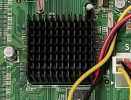
is the SOC the one on the main board with the heatsink? - I.E. this:

1791458541853.png

if so then the ducting from the 3.5" caddy only goes to the power supply board. - I have put the caddy back in anyway yesterday and also plugged the fan in anyway ..... just without the 3.5" hard disk in it!
 
is the SOC the one on the main board with the heatsink? - I.E. this:
Yes that's the SOC.
if so then the ducting from the 3.5" caddy only goes to the power supply board. - I have put the caddy back in anyway yesterday and also plugged the fan in anyway ..... just without the 3.5" hard disk in it!
Air gets sucked from more places than the explicit ducting. But you've put the caddy and fan back in so that's fine.

The remaining issue is where is the temperature sensed to turn the fan on? If it's like the HDR Fox T2 it's the temperature sensor in the hard disc itself, which means your box is now sensing the temperature in a completely different location in the case. Who knows what that might do.
 
Yes that's the SOC.

Air gets sucked from more places than the explicit ducting. But you've put the caddy and fan back in so that's fine.

The remaining issue is where is the temperature sensed to turn the fan on? If it's like the HDR Fox T2 it's the temperature sensor in the hard disc itself, which means your box is now sensing the temperature in a completely different location in the case. Who knows what that might do.
Thats a good point I never thought about. thanks. - which one has got the tempmonitor and fan over-ride package is it the Foxsat HDR or Fox T2 ? - its one of these ones that has it, might be the fox t2 hdr?
 
Thats a good point I never thought about. thanks. - which one has got the tempmonitor and fan over-ride package is it the Foxsat HDR or Fox T2 ? - its one of these ones that has it, might be the fox t2 hdr?
There's a package called Fan for the HDR Fox T2 that sets a minimum speed, I have it installed. I have no idea if similar exists for the Foxsat.
 
thanks . so just as expected fan and temp monitor is not there for the Foxsat. Must be just available for the Fox T2 HDR . They both share exactly the same 3.5" caddy and fan - it must be something to do with the software I suppose.
I dont suppose its worh my while downloading the fan and tempmon .OPK for the Fox T2 HDR and putting it on a USB stick and install it that way for the Foxsat HDR if that would work? - does anyone know?
 
Putting an SSD in is generally considered to be a bad idea. With the amount of writing to disk going on you will quickly use up the SSDs refresh cycles and render the disk useless. SSDs are just no good in any application where there is (semi-) continuous writing to disk.
 
Putting an SSD in is generally considered to be a bad idea. With the amount of writing to disk going on you will quickly use up the SSDs refresh cycles and render the disk useless. SSDs are just no good in any application where there is (semi-) continuous writing to disk.
SSDs are a lot more tolerant of that behaviour than they used to be.
 
I dont suppose its worh my while downloading the fan and tempmon .OPK for the Fox T2 HDR and putting it on a USB stick and install it that way for the Foxsat HDR if that would work? - does anyone know?
I doubt it will work, for a start HDR Fox T2 packages are compiled for a newer version of the MIPS processor so the code may not even execute. That's ignoring the interface to the fan hardware, which might also be different.
 
SSDs are a lot more tolerant of that behaviour than they used to be.
Well, they used to be terrible at that sort of thing; now they're not quite so terrible. SSDs still have a finite number of write/refresh cycles before they go wrong and you'll hit that number relatively quickly in a PVR.
 
Well, they used to be terrible at that sort of thing; now they're not quite so terrible. SSDs still have a finite number of write/refresh cycles before they go wrong and you'll hit that number relatively quickly in a PVR.
I believe @Black Hole has been trying and failing to kill a USB stick in an HD Fox T2. Not quite the same I know.
 
trying and failing to kill a USB stick in an HD Fox T2
I've got an SSD in my HD (replaced a 2.5" laptop disk which was driving me insane). Here are the stats:
Code:
ID# ATTRIBUTE_NAME          FLAG     VALUE WORST THRESH TYPE      UPDATED  WHEN_FAILED RAW_VALUE
  1 Raw_Read_Error_Rate     0x0032   120   120   050    Old_age   Always       -       0/0
  5 Retired_Block_Count     0x0033   100   100   003    Pre-fail  Always       -       0
  9 Power_On_Hours_and_Msec 0x0032   070   070   000    Old_age   Always       -       26383h+18m+44.330s
 12 Power_Cycle_Count       0x0032   100   100   000    Old_age   Always       -       451
171 Program_Fail_Count      0x000a   100   100   000    Old_age   Always       -       0
172 Erase_Fail_Count        0x0032   100   100   000    Old_age   Always       -       0
174 Unexpect_Power_Loss_Ct  0x0030   000   000   000    Old_age   Offline      -       169
177 Wear_Range_Delta        0x0000   000   000   000    Old_age   Offline      -       5
181 Program_Fail_Count      0x000a   100   100   000    Old_age   Always       -       0
182 Erase_Fail_Count        0x0032   100   100   000    Old_age   Always       -       0
187 Reported_Uncorrect      0x0012   100   100   000    Old_age   Always       -       0
189 Airflow_Temperature_Cel 0x0000   039   067   000    Old_age   Offline      -       39 (Min/Max 13/67)
194 Temperature_Celsius     0x0022   039   067   000    Old_age   Always       -       39 (Min/Max 13/67)
195 ECC_Uncorr_Error_Count  0x001c   120   120   000    Old_age   Offline      -       0/0
196 Reallocated_Event_Count 0x0033   100   100   003    Pre-fail  Always       -       0
201 Unc_Soft_Read_Err_Rate  0x001c   120   120   000    Old_age   Offline      -       0/0
204 Soft_ECC_Correct_Rate   0x001c   120   120   000    Old_age   Offline      -       0/0
230 Life_Curve_Status       0x0013   100   100   000    Pre-fail  Always       -       100
231 SSD_Life_Left           0x0013   097   097   010    Pre-fail  Always       -       0
233 SandForce_Internal      0x0032   000   000   000    Old_age   Always       -       22122
234 SandForce_Internal      0x0032   000   000   000    Old_age   Always       -       25793
241 Lifetime_Writes_GiB     0x0032   000   000   000    Old_age   Always       -       25793
242 Lifetime_Reads_GiB      0x0032   000   000   000    Old_age   Always       -       4740
It does have the Time Shift Replay functionality turned off though, and it doesn't record much at all.
 
Back
Top